SkyBlock Minecraft: the story of a living wiki
From an island of SkyBlock to a living wiki: the experience of building a tool to organize information and explore new possibilities with AI.
This archive includes automatic translations. Audio, video and text inside images remain in their original language.
It all started as many Minecraft obsessions begin: on an island in SkyBlock, alone, with limited resources and a constant feeling that the real bottleneck was not the game... but the information. Hours jumping between outdated wikis, buried forums, and disjointed videos to understand a single mechanic. At that moment the question arises: what if the wiki was not a dead file, but a living system that learns at the pace of the game?
SkyBlockCodexAPI is born from that friction, but also from that intuition: turning the chaos of knowledge of SkyBlock into a dynamic infrastructure where community, data and AI models not only document what happens, but understand it, update it and anticipate it.
The first phase was pretty straightforward on the surface: connect to Hypixel's public API and start displaying information about:
- items
- collections
- skills
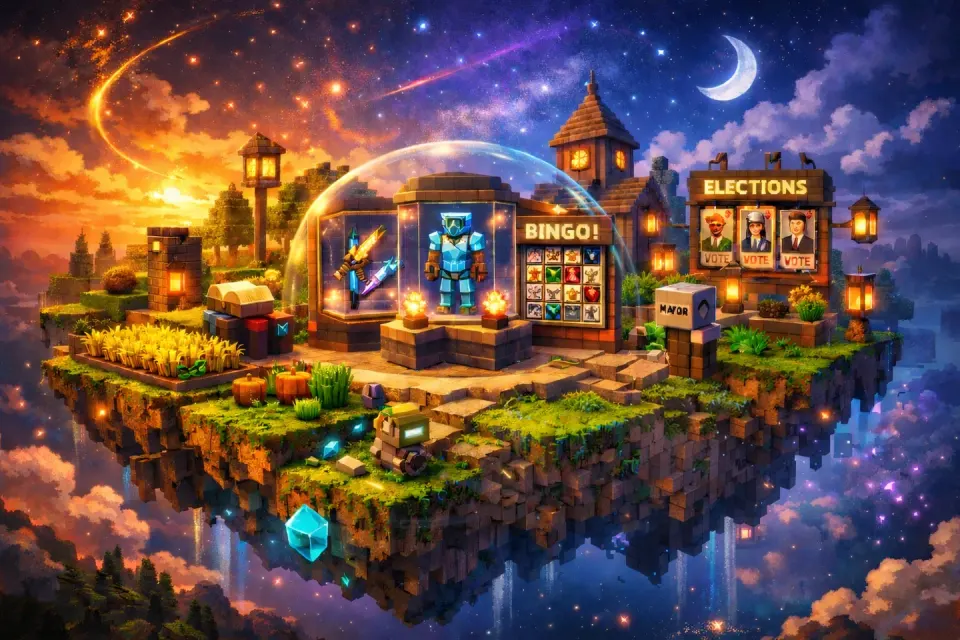
- elections
- bingo
- museum
On paper, the idea was simple: ask for data and show it. In practice, we soon discovered the real problem: the information does not always arrive in the same format or with the same level of cleanliness.
- Some descriptions came in plain text.
- Others brought lists.
- Others mixed lore, perks, unlocks and special fields.
- And many included Minecraft format codes like §7, §a, §d, or even alternative formats like %%light_purple%%.
That was one of the first moments in which AI began to add real value. It helped us:
- detect repeated structures within chaos
- propose normalizations without losing information
- transform formats designed for the game into something readable for the web
- speed up small iterations without losing visual coherence
It wasn't just about “translating JSON”. It was about interpret the visual language of the game and bring it to a web environment without losing personality.
The challenge of making it static without it feeling static
One of the most important conditions of the project was deciding that the application should live in GitHub Pages.
That imposed a very clear restriction: no traditional backend.
No persistent server.
No private logic on the server side.
Far from seeing it as a limit, we treat it as a creative restriction. If we wanted a static website, then we had to make it look dynamic using only:
- HTML
- CSS
- JavaScript
- calls to public endpoints
- a light but flexible architecture
AI was especially helpful here because it helped us rethink the project multiple times without having to redo the entire thing. As we discovered which endpoints were public, which were not, which things could be queried directly, and which needed to be simplified, we quickly adjusted the architecture.
The result was an important decision: bet on a very lively website, but without its own backend, taking advantage of only what could be resolved safely and publicly. That allowed us to keep the deployment simple and the project very easy to share.
A real difficulty: the visual format of Minecraft does not exist on the web
One of the most curious—and most entertaining—problems was the treatment of the text.
In SkyBlock, a huge part of the visual meaning is in the color. A perk doesn't just say something: how it says it matters too. A gold text, a light blue line, a red stat, or a purple rarity are not decorations; They are part of the game experience.
Typical examples:
- +0.5% ☣ Crit Chance
- +1 ❈ Defense
- +5 SkyBlock XP
- perks with embedded colors
- specially formatted item names
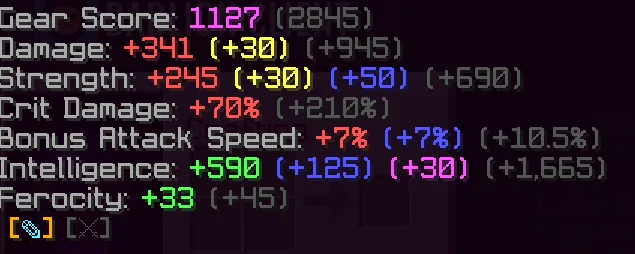
To show that well on a website we had to solve many small difficulties:
- interpret codes §
- interpret formats
- alternatives like %%light_purple%%
differentiate between symbol, number and text - respect the “+” without breaking the color of the stat
- apply different colors depending on the attribute
maintain visual readability without losing the style of the game
Here AI was especially useful as a rapid iteration tool. It helped us convert informal visual rules into concrete rendering rules. And, perhaps more importantly, to correct dozens of small bugs that appear when working with very irregular text.
Many of those mistakes would have taken a lot of time if we had gone case by case. With AI, it was much easier to spot patterns, check for exceptions, and adjust the outcome until it felt right.
Beyond the search engine: converting data into experience
Once the basic rendering was working, the next step was to stop thinking about just “displaying data” and start thinking about how to navigate a wiki.
There the decisions that gave the most personality to the project began to appear:
Search and suggestions
We didn't want a dead seeker. We wanted an agile search, with autocompletion and suggestions that gave a feeling of immediacy.
Added:
- real time suggestions
- search by items, collections and skills
- visual examples on the landing
- a search animation to make the home more attractive
In addition, we worked so that these suggestions were not just plain text, but rather respected colors, rarities and special formats. This way the search engine experience fit with the rest of the application.
Items: from a flat token to a really useful token
The items section was probably one of the most worked on.
It was not enough to show name, category and ID. That was too much like printing a JSON to the screen. We wanted something that spoke the player's language.
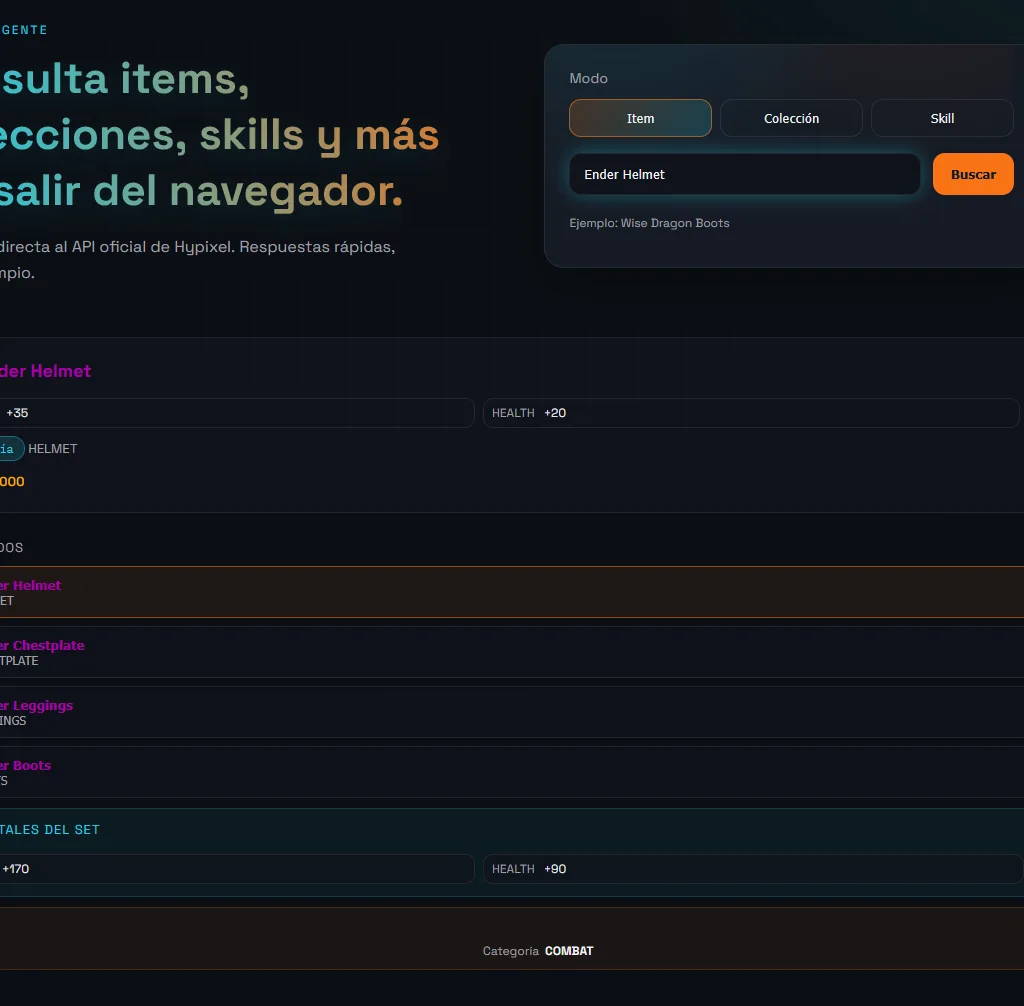
That is why the file was refined to include:
- name with color according to rarity
- support for specially formatted names
- image of the item according to its material
- head support with skin.value
- support for 3D icons in skull items
- handling images failing without showing broken browser icon
- visual, organized and colored stats
- Museum information
- related items within the same set
- sum of total stats of the set
We also had to solve very specific and very “SkyBlock” cases:
- legacy materials like gold_boots that in real assets are golden_boots
- tinted leather armor with color field
- sets with inconsistent names such as:
- Wise Dragon Boots
- Boots of the Pack
- Perfect Boots – Tier XII
Here AI was once again very useful, not by “inventing” the solution, but by helping us generalize rules. When we detected a rare case, we could quickly iterate over the logic and turn exceptions into reusable patterns. Getting to the final result
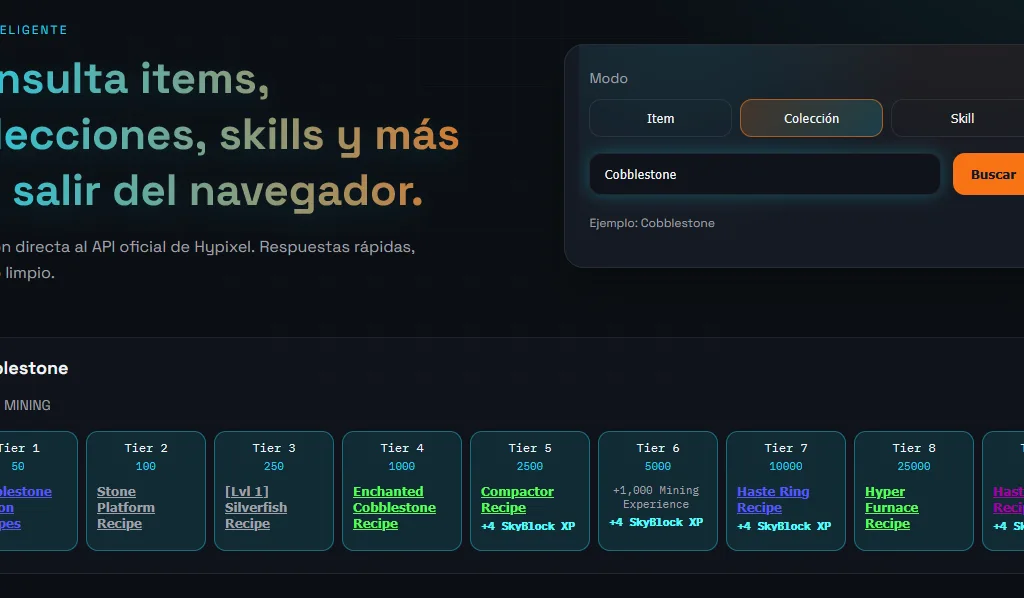
Collections: not only tiers, but context
The collections part also evolved a lot.
At first it was enough to teach category and tiers. But once we started using the web as a real tool, it became clear that that fell short.
We finish by adding:
- icons by category
- horizontal display of tiers
- unlocks within each tier
- SkyBlock XP highlight
- clickable unlocks when pointing to real items
- support for recipes and minion recipes
That allowed a collection to be not just a list of requirements, but a small navigable path within the wiki itself. From a collection you can jump to an item, and from the item continue exploring other parts of the content.
Skills: levels, XP and rewards with context
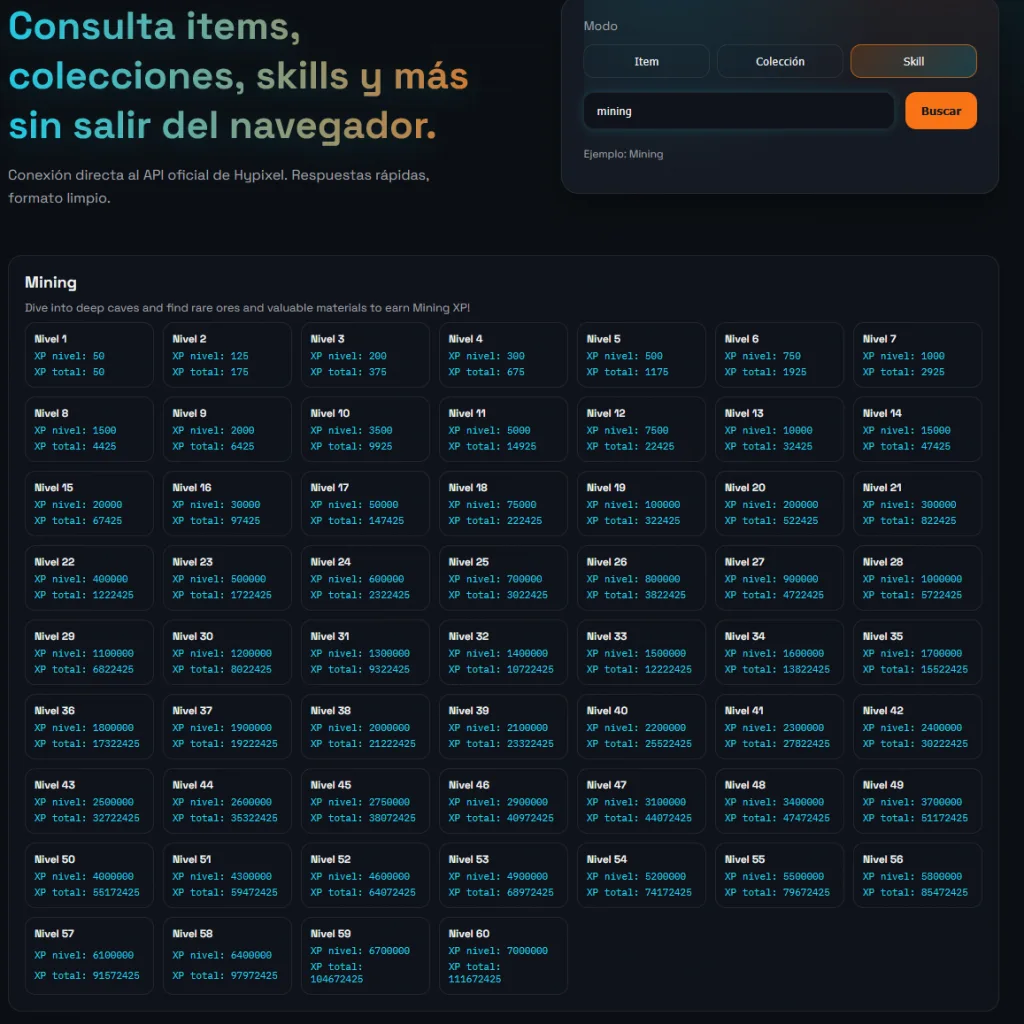
The skills section also required a good amount of work. Not only because of the data structure, but because the API information had to be interpreted correctly.
The API did not give the experience “per level”, but rather the total accumulated experience. So we had to recalculate and represent:
- level
- XP required for that level
- Total XP
- unlocks by level
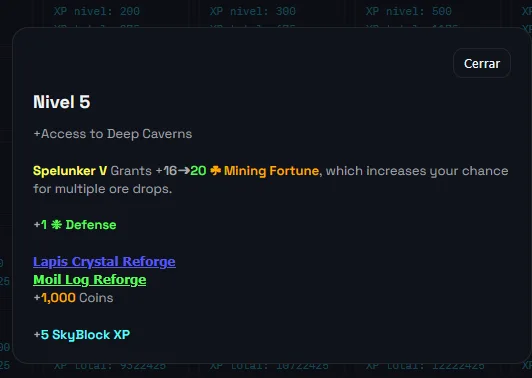
Then we added a detail modal for each level, where the unlocks are displayed in an improved visual format. And there the same idea that we had already learned was repeated: it is not enough to show text; You have to respect the visual language of the game.
Major and Choices: When the data model changes based on context
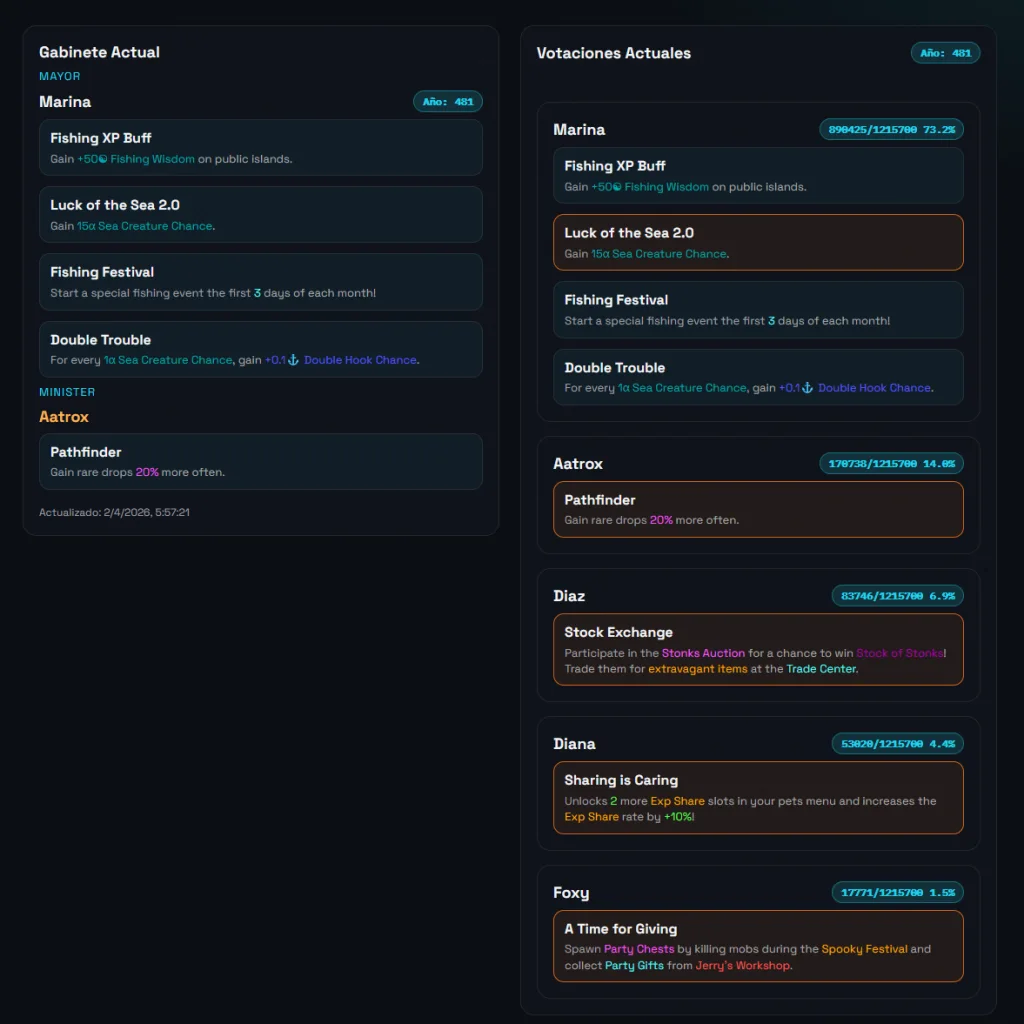
Mayor's part was especially interesting because he not only had to show information, but also interpret different situations:
- current major
- minister
- perks
- active elections
- candidates
- vote percentages
- possible special majors
At the interface level, we end up separating the page into two columns:
- on the left, the current cabinet
- on the right, the current votes
Then we refined the presentation:
- perks with title and description
- minecraft colors in descriptions
- minister perks detection
- visible years
- votes shown as x/y z%
- order of candidates from highest to lowest vote
And, as often happens in real projects, special cases appeared. For example, when the choice structure was not exactly where we expected or when the previous choice was being shown instead of the current one.
These types of problems are precisely where AI really saves time: not because it “guesses” the answer, but because it allows us to quickly test more robust parsing strategies until we find a consistent solution.
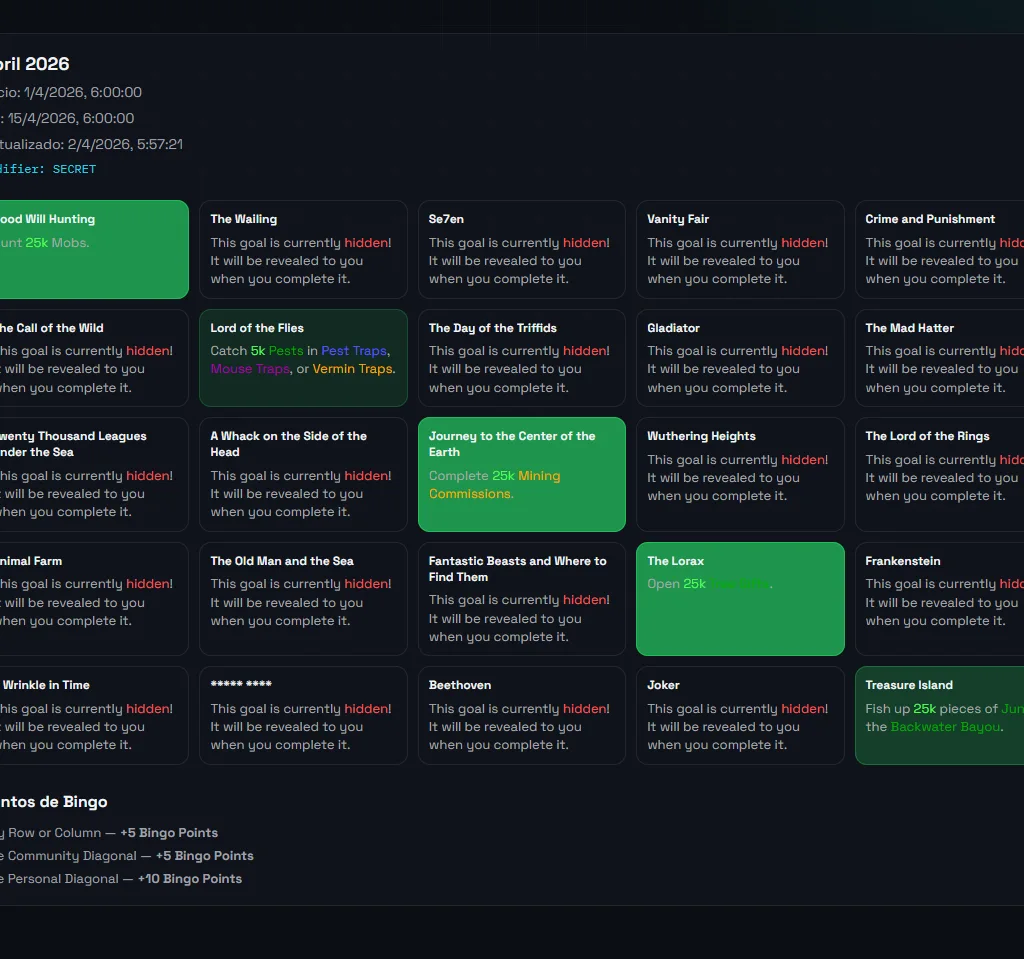
Bingo: convert an API into a playable card
The Bingo subpage was another of the most fun parts to build.
We didn't want to list objectives vertically. That was nothing like the actual game experience. So we turned it into a 5×5 card, visual and navigable.
Added:
- 5×5 grid
- modal by objective
- full lore within the modal
- hover interactivo
- community goal detection
- progressive coloring according to tier reached
- contextual point information
- separate navigation on its own subpage
With Bingo, more than any other module, the difference between “showing data” and “designing an experience” was clearly seen. That change in mentality was one of the best decisions of the project.
Museum: organize without cluttering
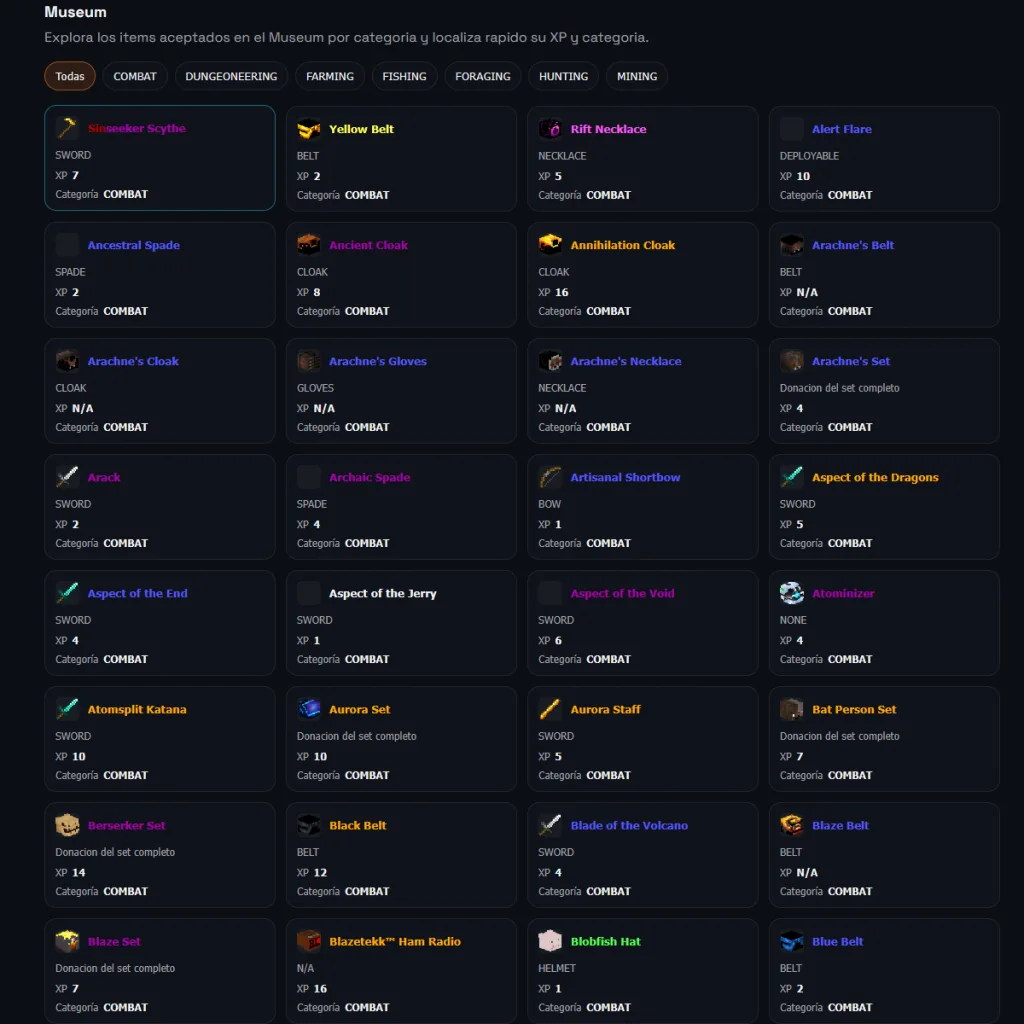
The Museum section was born as a natural necessity of the project. Once we had well-rendered items, it made perfect sense to build a dedicated browser that allowed exploration:
- What items does the Museum accept?
- how much XP does each give
- What category does it belong to?
In addition, we specifically worked to avoid unnecessary noise:
- armor set deduplication
- clean display by categories
- representative icons
- navigation from Museum to the corresponding item
And also here the nuances appeared: complete sets, main helmet icon in Museum, different ways to extract donation XP, etc.
What Codex really contributed
At this point, the contribution of AI can be summarized very well: less friction, more iteration, more consistency.
- It did not replace human judgment.
- It did not design on its own.
- He did not make important decisions without supervision.
But it did make it possible to work much faster on tasks like:
- detect patterns in inconsistent data
- propose cleaner render structures
- maintain consistency between pages
- debug small but annoying visual bugs
- adjust special cases without slowing down the pace of the project
And that has enormous value, because in projects like this the real enemy is usually not pure technical complexity, but rather the accumulated wear and tear of a hundred small details.
AI helped precisely there: in keeping the project moving.
Current result
SkyBlockCodexAPI today is no longer an idea, but a solid and functional foundation.
Currently includes:
- fast search engine
- smart suggestions
- rendering faithful to the visual language of SkyBlock
- much more player-oriented item sheets
- separate pages for Mayor, Bingo and Museum
- support for colors, perks, rarities and special formats
- clear navigation between sections
- deployment in GitHub Pages
All this without a traditional backend, maintaining a light architecture that is easy to share.
Code and application
You can access the source code at:
https://github.com/SaturdaysAI/SkyblockCodexAPI/tree/masterhttps://github.com/KenjiEtsu/SkyblockCodexAPI
And you have access to the application at:
https://saturdaysai.github.io/SkyblockCodexAPI/museum.htmlhttps://kenjietsu.gitwhub.io/SkyblockCodexAPI/index.html
A history of the Saturdays.AI community. Originally published on Apr 15, 2026.
← More community stories