COVID-19 minimum distance detector using artificial intelligence
Donostia. First Edition. 2020 On the fateful March 11, 2020, the WHO declared the global pandemic due to COVID-19. More than 300 days later, we have decided to make the work we have done public and accessible to the entire world…
A learning project shared by the community. The article documents its team, methods and results; it does not establish that the prototype is ready for real-world use.

This archive includes automatic translations. Audio, video and text inside images remain in their original language.
Donostia. First Edition. 2020
On the fateful March 11, 2020, the WHO declared the COVID-19 global pandemic. More than 300 days later, we have decided to make public and accessible to the entire world the work we have been developing for more than 8 weeks.

Get ready, governments and health institutions on the planet, because what you are going to see in this article will establish the foundations of a new surveillance system that will ensure compliance with one of the measures that has been repeated the most during these fateful 300 days: the interpersonal safety distance of one and a half meters.
Our tireless group, made up of 3 “crazy” engineers (some of them in progress) has worked day and night to bring the best possible solution to this problem.
The project, which began under the name WATCHDOG (guard dog) for the initial mission that we had in mind (a robot with autonomous movements that monitors compliance with the safety distance and that barks every time it is broken) was going to offer, beyond the obvious benefit of a constant reminder to people of the need to comply with the measure of interpersonal distance, a tool for mapping and creating “hot spots” in which the distance was violated more often.
For all this, the team has tried to create a convergence between the worlds of electronics and Artificial Intelligence, making use of the most innovative means at its disposal. With a Raspberry Pi 3, a low-level microcontroller equivalent to Arduino Mega, different means for communication, algorithms, libraries and convolutional neural networks, we have tried to achieve the solution with the greatest possible satisfaction.
The project
For the project of Saturdays.AI it has been thought about developing a project watchdog (guard dog) that monitors the minimum distance recommended by Anti-COVID protocols.
The initial approach has been to program a robot capable of emitting a bark when the safety distance (required by Anti-COVID protocols) was broken, sending the acquired data to a server and performing a mapping (heat map) in real time.
The basic objective of the project is converge the OT world with the IT world, that is, the convergence of electronics with that of AI (artificial intelligence) very fashionable in the IT world, using Deep Learning, which is one of the branches of Machine Learning. In fact, although this first edition of AI Saturdays Euskadi has been oriented towards Machine Learning In general, we have decided to delve deeper into the Deep Learning of his own free will.
Little by little, autonomous electronic cards are being developed that work At The Edge (that is, the same control card applies the algorithms) without using the Cloud for this, or without using a more powerful PC unit for processing. This phenomenon, known as Edge Computing, allows you to alleviate the processing load on central servers by delegating tasks that may be simple but repetitive to external nodes.
Operation
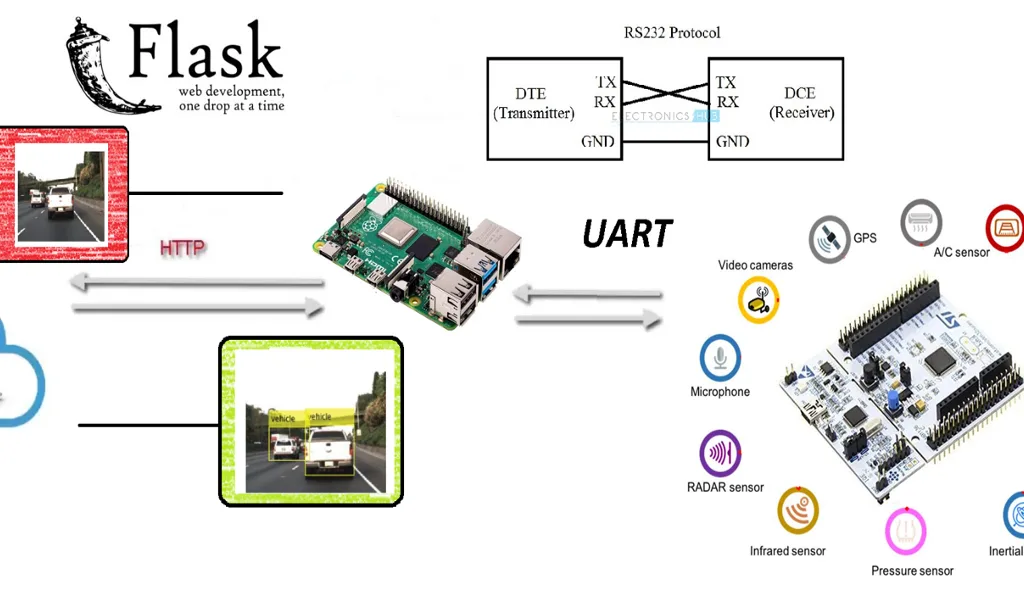
When 2 people are detected, it sends the detection position and the distance violation image to a Web server, created with Flask.
As far as mapping is concerned, the initial idea was to perform a SLAM mapping (simultaneous localization and mapping) using a sensor lidar or a 3D camera, but we have found limitations to make a Point Cloud that would allow us to execute the mapping. This limitation is described in Future Work.
Objective
The initial objective was to capture all the code inside a Raspberry PI 3 card (hereinafter RPi3), but although there are libraries to control the input and output modules (GPIO), the device is not powerful enough to be able to process everything in real time. For this, there are dedicated and deterministic modules that facilitate these tasks.
To try to meet the objective proposed here, a microcontroller has been used. STM32F411RET. This is a low-end microcontroller equivalent to an Arduino Mega, but with a real-time operating system (Real Time Operating System or RTOS), being deterministic, you have control of the timing and tasks, being able to have greater control for the acquisition of data and response of the actuators.
It was decided to use this technology due to the large number of robust libraries that exist to control peripherals.
YOLOv4 algorithm
The final algorithm that has been used has been by a landslide YOLO (in our case), compared to others known as SSD (Single Shot Detection) or the most precise of all RESNET technologies.
The challenge in this section has been to find the technology that best adapts to real time and we base ourselves on the golden rules that one of the mentors said:
1. What is happening in the market? What is its trend? What type of architecture is most viable with the budget and time restrictions you have?
2. Look at what the greats do. Can we think the same as them? That is, do we have to consider training extremely complex networks, or do we have to put our feet on the ground and come up with faster examples to build a Minimum Viable Product (MVP)?
3. Adapt!
In this formula, the result of 1+1 in engineering would be deterministic but in real life the result is stochastic, so it depends. ?
This project is limited to mid-range computing capacity and we wanted to squeeze as much as possible from that point of view. For this reason, the best algorithm we found, which was purely written in C (being a terrible challenge to apply mathematical functions barehandedly; we take the opportunity to thank Joseph Redmond) is the fastest compared to libraries written at a higher level (TensorFlow, pyTorch).
As a curiosity, using the embedded version of SSD you reach about 18 Frames per Second (FPS) compared to YOLO, which reaches 24 FPS. Without having added telecommunications we realized which was the way to follow, but all kinds of resolutions were found for the different technologies.
“It should be noted that for the team, the most complete and adapted algorithm or technology if it had a little more computational capacity would be RNN or FAST-RNN, since in one run we would not only have the position of the objects, but each pixel of the image would be linked to a class and with this the project could be given the ability to contextualize itself in the environment. And this would lead to more adaptive power, having in particular a positive effect for the field of Machine Learning, where more DATA to which we can give value taken from the environment.”
If you are even more curious about it, we leave you this link.
As this would extend to infinity, the details of its operation will not be explained in depth; attached a link where the algorithm is explained in detail in its v3 version. The difference is that in the v4 version the precision increases but in its tiny version the speed remains constant.
EDA: And now… We put the “Data” from our sensors into the black box!
The analogy of the “EDA” carried out in our Deep Learning project would have to do, among others, with cleaning and preprocessing done on the images obtained. The first preprocessing executed would be the one offered by the OpenCV BLOB function that reduces the 8-bit scale (255 RGB) to a unit percentage scale.
This detail is very important since it passes the result of any camera to which the algorithm needs input. Bad? That floating point data is flown and that requires more computational expense but its authors have already taken care of that problem.
The “tuning” of the parameters in this aspect that we have done has been to convert the input image to the smallest scale (316 x 316 pixels).
Having done this first step, the image will go through multiple internal filters changing the dimensionality of the input and readapting in the best Nolan style with films of the caliber of Tenet or Inception. The result?
The YOLOv4 algorithm delivers the image data in an array composed of 13x13x (A x ((B+P) + C)), being:
- A: The amount of anchor boxes (being a anchor box a “space in which the possible presence of an object can be detected”).
- B: The position coordinates of the object.
- P: The confidence probability that there is an object.
- C: The classes we want to identify and their respective probability.
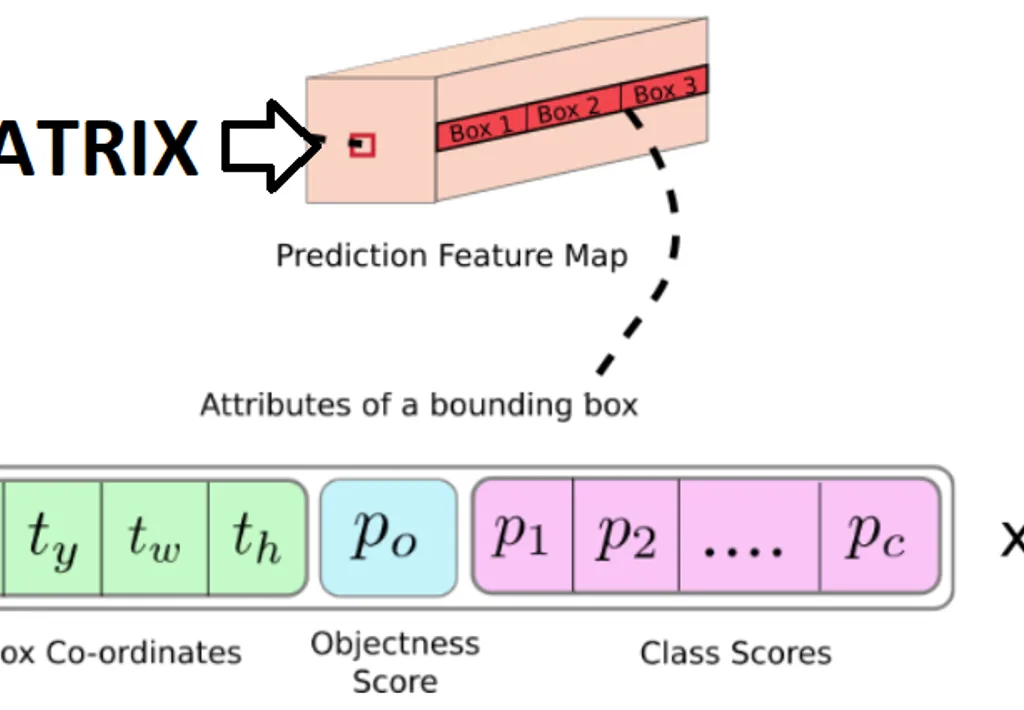
Within the “coco.names” file are the classes associated with their respective names, but from this result “only” the results in which the class is a person are filtered
? And why not retrain the network by applying transfer learning?
Be careful, since our team fought to improve the response of this algorithm to increase and give more value to the output matrix of the tiny version.
The results, unfortunately, were not what was expected. The feature map created in these models is based on very large amounts of data and a lot of variety in the topic of vision, where large amounts (10,000 images) are necessary so that the processing can be fluid. And it is true, if it were retrained based on transfer learning we would save many input images, but we must also take into account the classes of objects that we want to recognize. The more classes of objects there are, the better the feature map learns to separate each class.
For this reason, the weights of the COCO version have been used for the YOLO algorithm, since it was the most similar for our case.
Next, a second filter is applied, used to apply the BBOX of the different anchor boxes to see which one is the best.
These previous steps would form the EDA process as such. However, compared to an ML process, the filter that would be applied would depend on the degree of confidence in the detection of an object, while in an ML process the “manipulation” is usually done on the same data.
All this is assembled in a function called “Impure Detector” which will return the data that interests us most in a Python list in the following way:
[Coordinates of People, Index_Impuros]
RPI3
The Raspberry 3B+ has the Raspbian operating system and OpenCV libraries (4.1.0.22).
The general operation is simple: The image data is processed and forwarded to a Flask Web server installed on a PC.
We can see more details about the RPi code in CLIENT.py:
● Serial Communication
We have a serial communication with the microcontroller. After a few tests we have realized that the maximum speed with which the RPi can work with python is a BaudRate of 115200 Bits/s, which limits the ability to improve the waiting time between Client-Server. We note this aspect as Future Work.
● MQTT
MQTT has also been used to send the data regarding the “safety distance violation” to another server. However, as mentioned before, a heat map has not been created with the area of “safe distance crimes” in real time, but we managed to send the data and insert it into a remote file, saving it in a CSV file within the server.
A future job that, unfortunately, we could not reach, was to generate a small script to graph or plot that data.
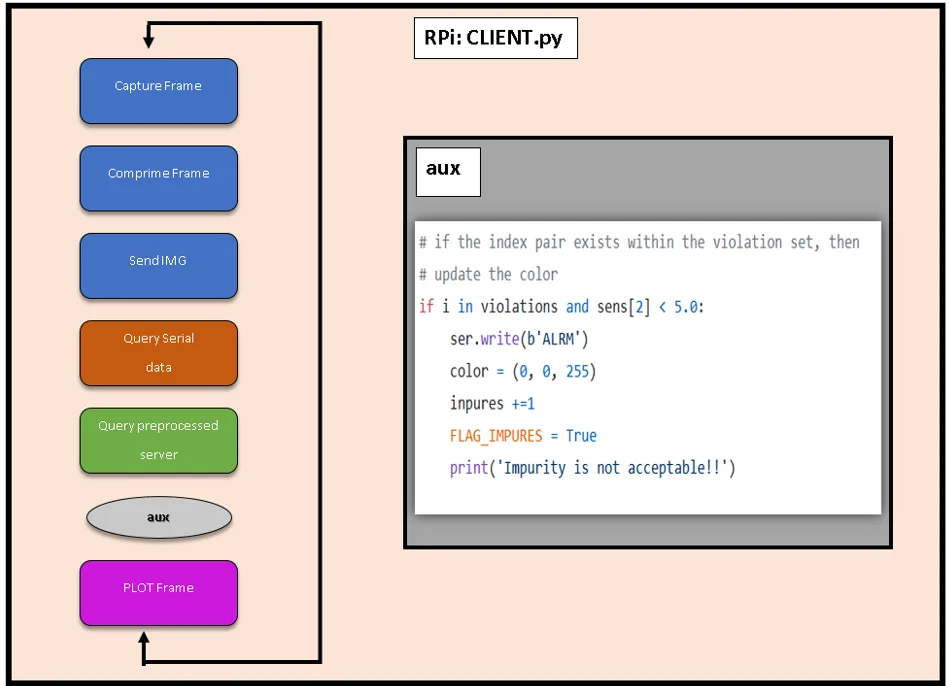
The block diagram obtained for our process.
Images are quite problematic since sending packets of information that are so long and in which the order influences is complicated, it is necessary to index them. Many, many different methodologies have been tested and the one that has given the best results has been using a REST API from the server.
FLASK Server:
On the Internet you can find everything except what you really want, therefore we have had to develop the system for sending compressed images over HTTP.
For this, the image functions par excellence have been used, collected in the Open Source package OpenCV using a dynamic buffer, avoiding writing to disk. This is because experience has shown that, in the long run, if they are not taken care of, servers “age” or “degenerate.” This avoids, for example, forcing the flash memory media and controlling the read/write cycles applied.
After using OpenCV, our system creates the capture in a buffer, compresses it and sends it to the server, who decompresses it and writes it to disk, leaving it ready for storage and/or post processing. This sending is done in JSON format since there were errors when sending them in other formats.
? How to send data that is constantly variable over time?
Normally, for two people and/or machines to communicate they have to speak the same language. In Machine Learning, in addition, data is usually sent in constant blocks of information and of reduced size. In our case, the steps that our client is going to execute are sequential and if he stumbles at any point everything will go to waste.
Therefore, “dummy” data has been created to be sent at a minimum so that all pieces of the project can work synchronously and in harmony.
The “impure” ones are going to mark the index of the object that is sinning but it is not going to be fixed in the negative ones. Therefore, that is the reason why the project manages to work without this small bug being noticed.
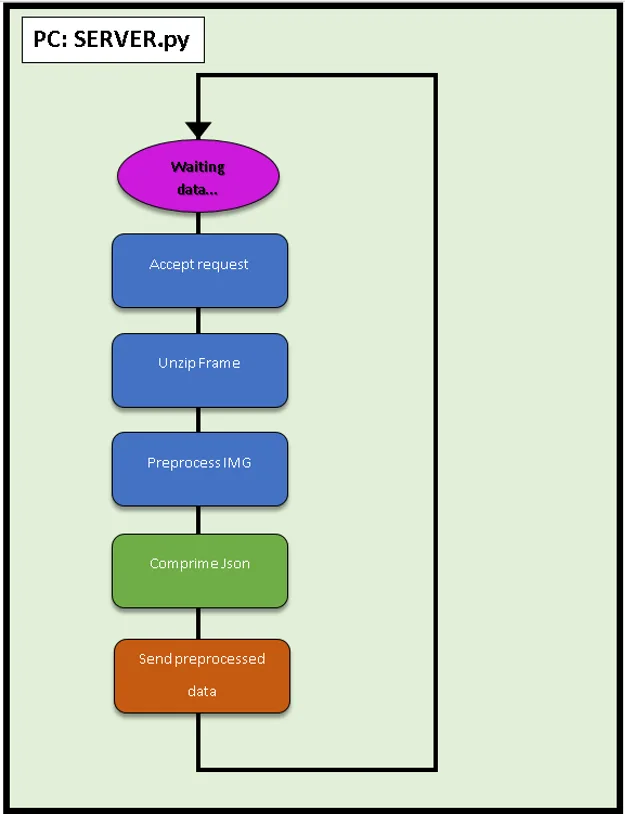
General diagram of the operation of the Flask server.
Microcontroller
This microcontroller has been chosen (STM32F411RET) for an option that an Arduino did not offer:
Scheduling different subtasks to run concurrently in addition to interrupts.
Programming in the STMCubeIde gives us the option of having the ease of programming of Arduino, as well as libraries for more industrial environments.
Unlike the Arduino in which the use of multitasking by putting them in a process Round Robin is very complex, added to the limitation of the number of timers or timers offered by Arduino Uno 3, with the STM32F404RE These problems in inserting them into the industry are mitigated.
Therefore, once the micro has executed the initial configuration (tasks, interruptions, timers...) the program will begin to execute the tasks applying a Round Robin, which are grouped in the following scheme:
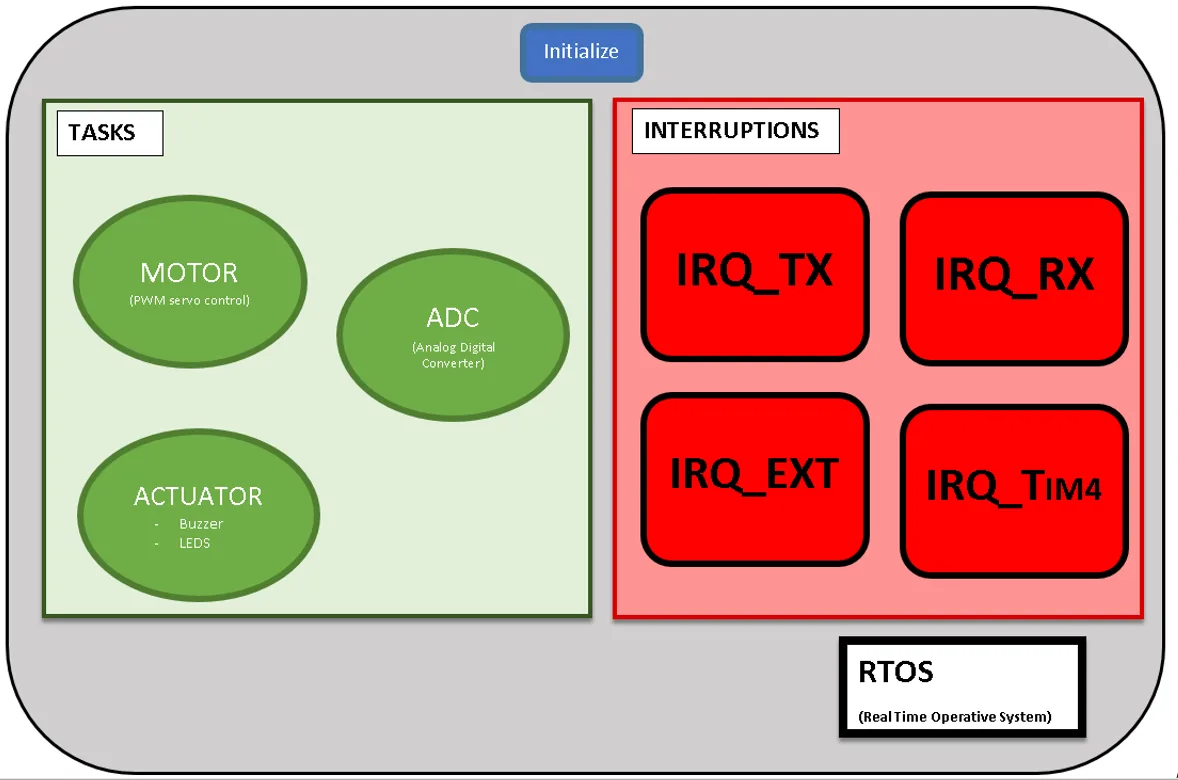
Outline of existing Tasks or Concurrent Programs.
Within the existing concurrent tasks or programs there are three:
1. ADC
This applet is responsible for reading the digital inputs and processing them in 10–12 bits; aspect that when read by Arduino will only offer 8 conversion bits.
Once finished one by one in sequential order, it will insert the data by applying their respective conversions in a global int32 vector, the reason for saving them as int and not in float being that the amount of space they occupy would double (from 32 to 64 bits, due to floating point).
As can be seen in the image of the Universal Asynchronous Transmitter-Receiver (UART) shipment, 4 data are sent for each sensor. The last data is what would remain behind the floating point for subsequent simple preprocessing in the RPi.
An example of this would be receiving a value of 1004 from the distance sensor and transforming it to 100, 4 in this case simulating meters of depth.
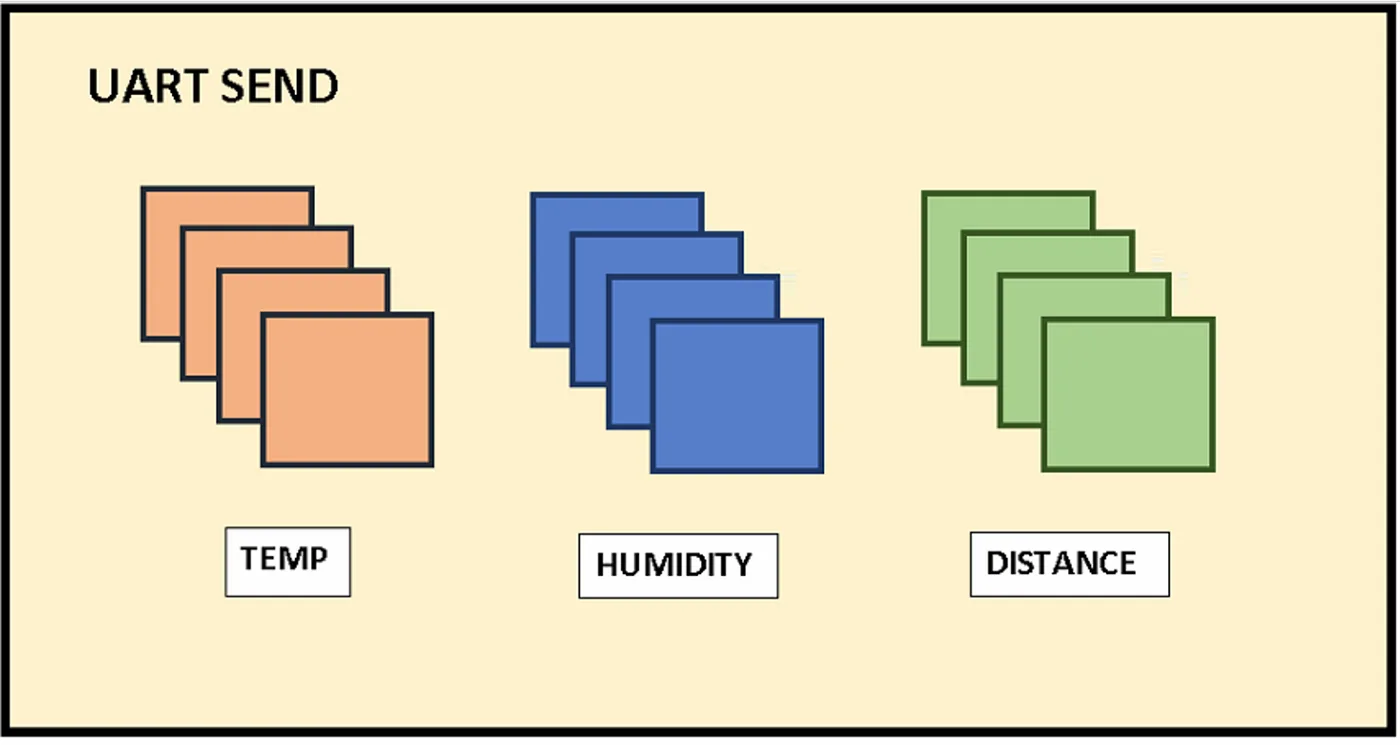
Sensors connected by UART to the microcontroller
2. ACTUATORS
Within the actuators we can find that the states of the digital outputs belonging to the Buzzer and LED_EXT will be switched, responsible for providing the robot with notifying the environment acoustically and visually.
The motor actuator has not been added because it is believed that separated it is better understood when distributing the code.
3. ENGINE
The servomotors work between 500 and 2500 ticks so our task TASK_MOTOR will take advantage of the interruptions of timer_4 to change its ON/OFF value.
In addition, an accumulator has been added, so that if while a violation of the safety distance is detected and before the function is turned off, an interruption due to the distance violation is received again, the waiting time will increase by 5 more seconds in that position. With this we ensure that there is greater control of the presences detected.
Interruptions
Interrupts are synchronous or asynchronous requests to the clock in which the processor will put aside the task it is performing to focus on the interruption.
We have defined 4 types of interruptions.
1. IRQ_EXT:
It is the external interruption by button that will be accessed in case there is a communication or any other error to reset the microcontroller configuration without resetting everything. It will resend the information and notify us by sending a “DONE” through the serial port.
2.IRQ_TIM4
The microcontroller timer_4 has been configured to run every 1 MHz.
In summary, to take 50 Hz, which is the speed of the servomotor, we have to add a counter register of 0–2000 units so that it enters the interruption every 50 Hz.
That is, in every 200 ms we will receive 20,000 ticks. Or put another way, every 200 milliseconds our microphone will interrupt the interruption of that timer.
3. IRQ_TX:
This interruption will only turn on an internal LED of the microcontroller to quickly know that everything is working correctly.
In the figure below, in addition to seeing the pin distribution, you can see the internal LED pin as well as the internal button of the microcontroller.
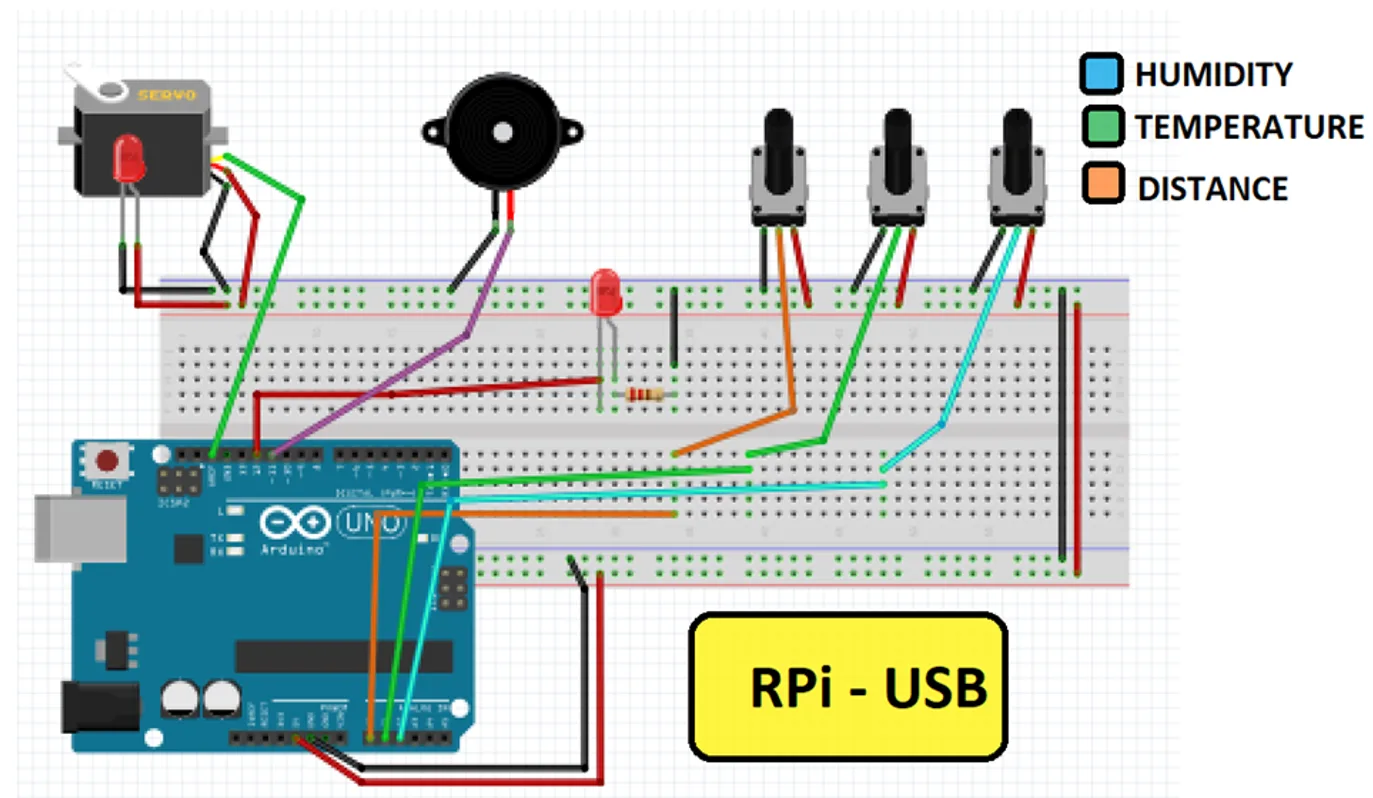
Project pin distribution.
4.IRQ_RX:
Despite being last on the list, it is the most important interruption. For the RPi to act as a “thinking head”, an interrupt is necessary that is attentive to any asynchronous signal it receives from the microPC and alerts the RPi.
The commands that will be sent from the RPi are two:
- “SEND”
- “ALRM”
When we receive SEND the microcontroller will send the data it has at that moment in the vector “sens”.
If you receive ALRM It will execute the actuators and if before it runs out it receives an ALRM input again, its time will increase.
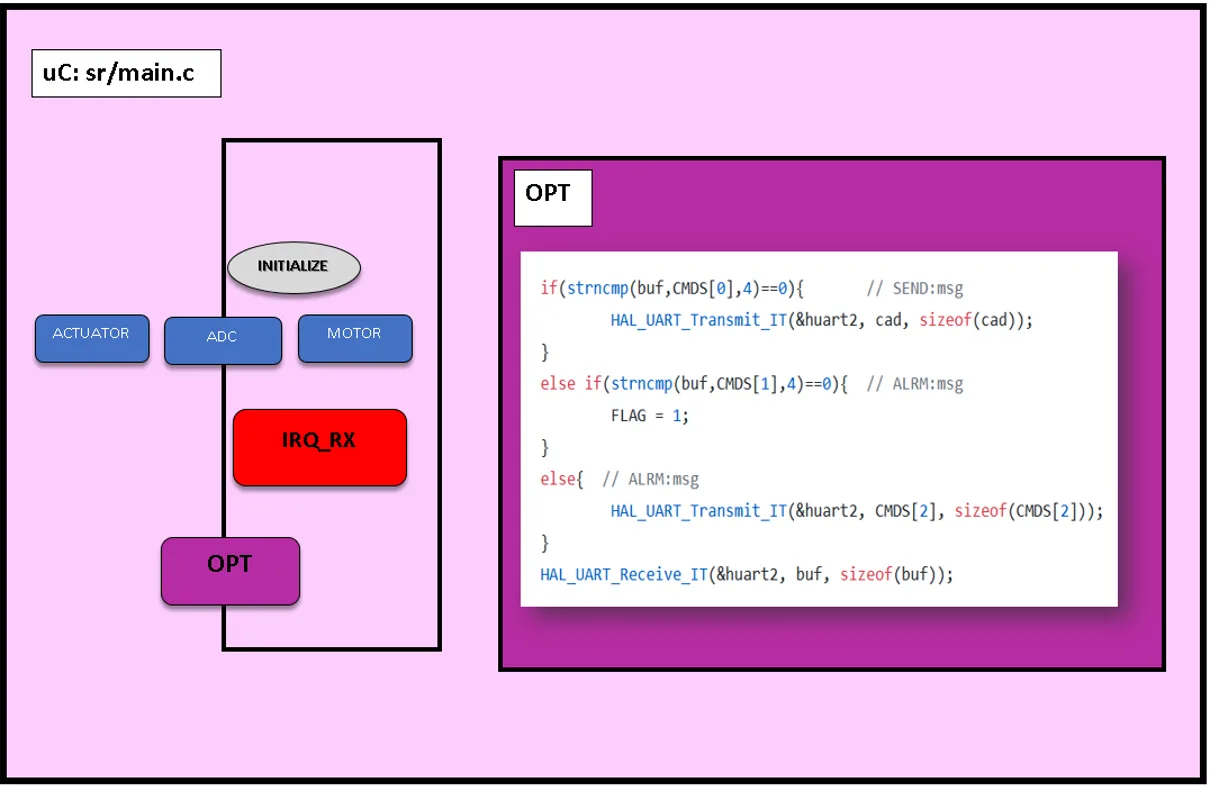
Figure showing sending signals to tasks.
Conclusions
It is an apparently simple project, but behind everything there is a very complex ecosystem that we wanted to get our hands on. You just have to look at the architecture of the infrastructure that remains:
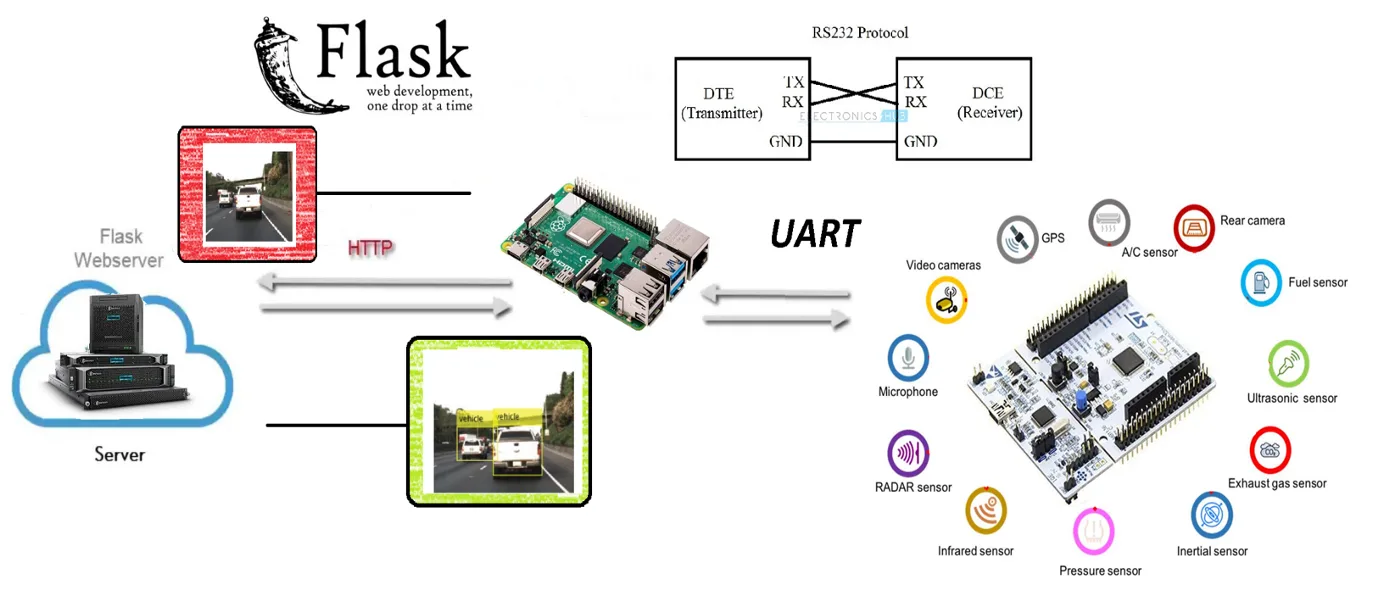
- Sensors – Microcontroller Unit (MCU).
- MCU – RPi.
- RPi – PC: Use of HTTP protocol with POST requests to the web server (REST API mounted in Flask).
Although the objective was to apply themes of Machine Learning, these topics require a certain architecture and functions for communications, image processing, etc. The topic of SLAM + ML has been left at the door but steps have been taken to continue with it.
And in the long run, the objective that had been set was to apply this technology to the real world apart from IT and give it a more industrial application, we believe that although it has not been achieved, it is one step closer with the use of these “homemade tools”.
As a reflection obtained, we have detected that if Cloud Computing is going to start being used, for the next generations it will be necessary to encrypt the very dense information that is sent (even if latency is sacrificed), since it is a very serious issue that is currently being given little importance.
Future work
We have detected different tasks as future work for this project:
- The environment mappingas well as geolocation indoor. We have performed tests with the GPS system we purchased, but this system requires you to be in an open space for it to function. To facilitate this geolocation with alternative systems, we would consider the use of _indoor geolocation (_via AprilTags, Bluetooth Low Energy or BLE, etc.).
- The improvement of microcontroller, an aspect that could help to more than double the processing speed of the RPI, which could help us compensate for the delay generated in Client-Server communication.
- The creation of a script plotting to graph the data obtained through the MQTT connection.
Members
Project presentation: DemoDay
Repository
In the following repository you will find the code used to develop this application: https://github.com/SaturdaysAI/Projects/tree/master/Donostia/Donostia2020/Impure_Detector-main
More artificial intelligence!
The mission of Saturdays.ai is to make artificial intelligence more accessible (#ai4all) through intensive courses and programs where projects for good are carried out (#ai4good).
Explore our AI master’s programme at https://saturdays.ai/master-ia-online/
If you want to learn more about artificial intelligence join our community at community.saturdays.ai or visit us on our website www.saturdays.ai Join us!
A history of the Saturdays.AI community. Originally published on March 16, 2022.
← More community stories