
I built a Canyoning app without writing code: my experience creating a PWA with AI
Discover step by step how I developed the Canyoning webapp that I couldn't find, with ChatGPT, Codex and AI. Code, guide, examples and tips from this learning so that you can apply it.
This archive includes automatic translations. Audio, video and text inside images remain in their original language.
Introduction
Like many mountain lovers, I would like the possibility of having a minimalist page, where I can find information about the ravines in a simple way and that would allow me to consult the tracks when I had no coverage instead of jumping between ten websites to find reliable information about a ravine. Furthermore, Wikiloc the GPS gave me, Descente-Canyon the technical data, but nothing was unified and, above all, nothing worked well without coverage in the middle of nowhere.
So I decided to build it myself, here is the link to the result: https://saturdaysai.github.io/barranquismo/
I wanted a simple website: filters, maps and that works 100% offline. But this time, I decided not to do it alone. And not only that, but you wouldn't write a line of code. So I looked for two colleagues to do it for me:
- ChatGPT, as a technical and UX consultant.
- Codex (integrated into Visual Studio Code), as executing programmer.
My goal: to demonstrate that, with good planning and precise prompts, a single person can build a functional application, from scratch, using only AI.
Phase 1. Planning and choosing the stack
Before writing a line of code, I needed a solid plan. My first interaction was with ChatGPT, to define the technological architecture.
Prompt clave a ChatGPT:
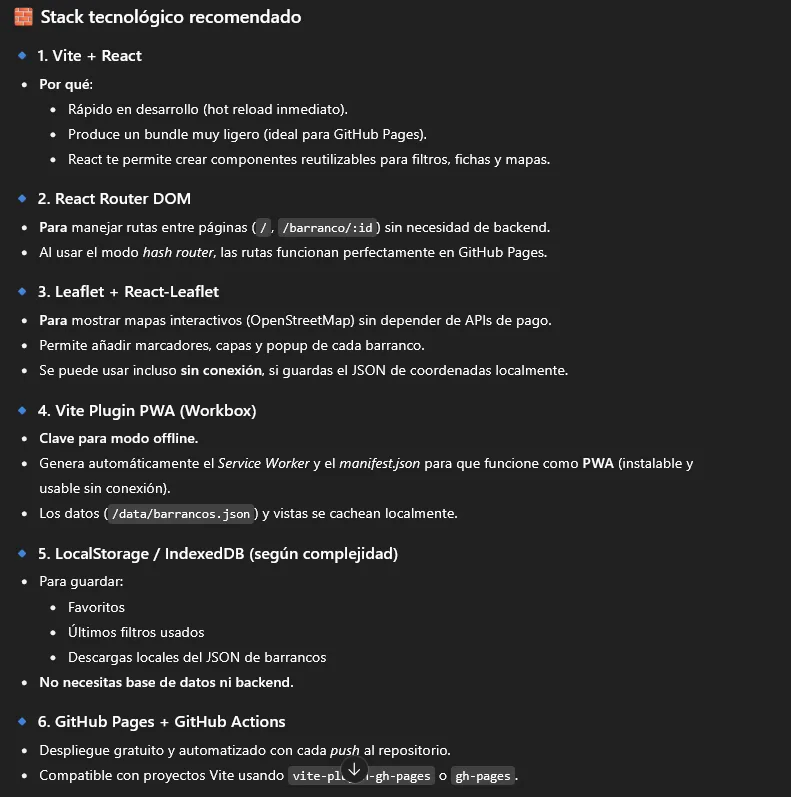
“Quiero construir una web para un inventario de barrancos. Los usuarios deben poder filtrar por dificultad y ver mapas. Lo más importante: debe funcionar offline. No quiero usar backend y planeo desplegarla gratis en GitHub Pages. ¿Qué stack tecnológico me recomiendas y cómo debería estructurar el proyecto?”
The IA recommended Vite + React for its speed and ease to configure Service Workers, essential for offline mode. With that, it already had the technical compass of the project.
Phase 2. Initialization of the project in Visual Studio Code
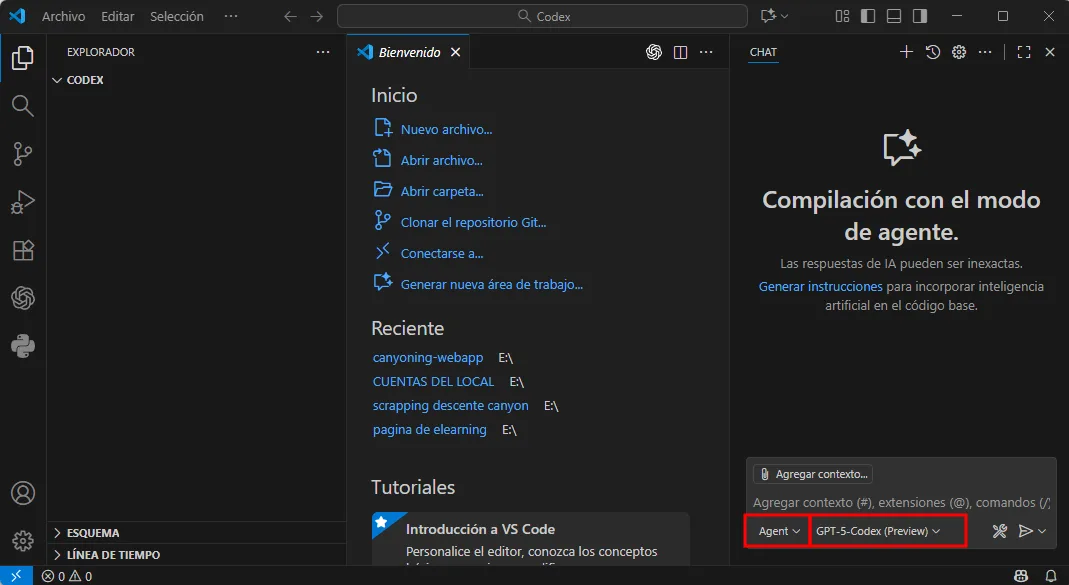
I opened a new folder (canyoningApp) and, from Visual Studio Code, I launched Codex in agent mode. I selected the AI GPT-5 Codex Preview and asked it to start the project step by step. Introducing the prompt that ChatGPT had provided me, modifying the format a little so that it adapted to my needs, incorporating stops and providing feedback during the process.
Phase 3. Design of the base structure
The next step was to define the navigation structure before loading data or designing the interface.
Prompt de ChatGPT a Codex:
- We will develop a static PWA-type web app with descriptive sheets of each ravine, necessary material and external links (Wikiloc for approach and return). I want you to help me step by step with this structured workflow:
- Land the idea (concept): define the purpose, the key functionalities, and the technological stack (React + Vite or pure JS).
- Plan the architecture: folder structure, use of localStorage instead of database, no authentication, all client-side, suitable for deployment in GitHub Pages.
- Build the project: create the code base with documentation in comments and guide me phase by phase (structure, home page, tabs, map, local persistence, filters, layout, PWA).
- Document the process: each step should include brief explanations, commented code, and notes so you can then write an article/tutorial.
- Prepare Deployment: Show how to configure vite.config.ts or index.html for GitHub Pages.Conditions:
- All persistence must be done with localStorage.
- Do not use any backend or login.
- Modular, clean and commented code.
- Use English in the code, but Spanish in the explanations.
- Ask for validation before advancing to each phase.
- The app must be responsive and light. Start with phase 1 (concept) and wait for me before moving on to the next phase. When I say 'continue', you move on to the next one.
- Generates the React component structure (by folders) and the code to manage this 5-tab navigation and nested detail path»
Next he asked me several questions in relation to what I had understood (codex) to continue, the with the execution:
In each of the answers he gave me, I asked ChatGPT if Codex was doing it correctly, and if so, I continued with the execution:
The result was a modular skeleton of components with routes, pages and a professional folder structure. Codex took care of creating the initial files, dependencies and configuration of the project automatically.
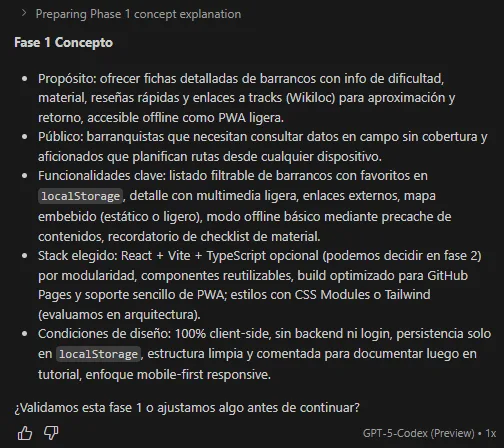
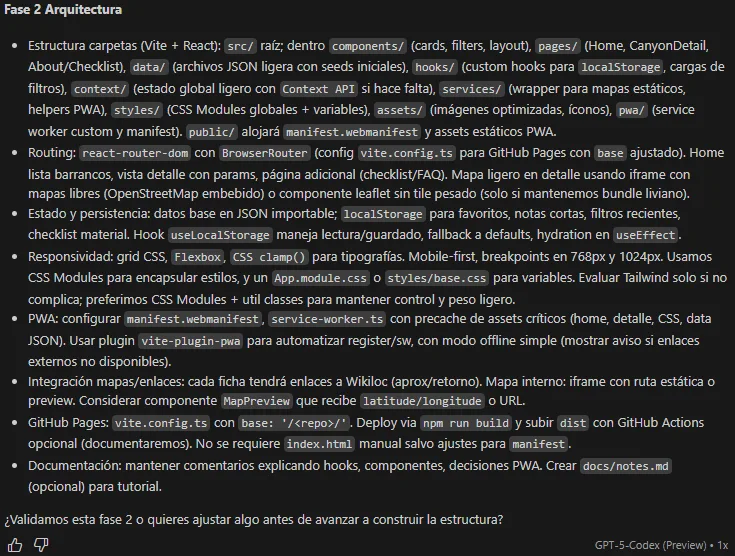
Now, Codex started working, generating folders and files, during the process it is asked if you want to execute some system and debugging instructions, to which you say yes so that you can make the modifications it has to do.
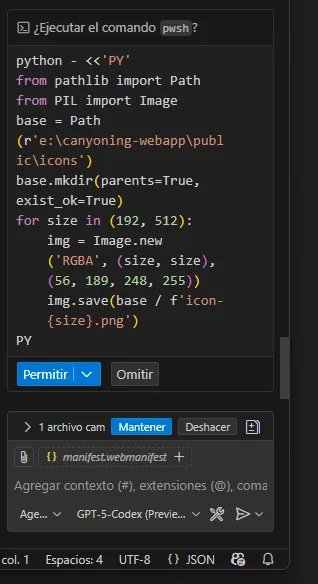
After a few minutes, Codex generated the entire folder structure, dependencies and scripts.
The best of all is that the project compiled without any compilation or execution errors, simply incredible... Once finished, I tried starting the server locally. But I didn't know how to build the web app so I asked him:
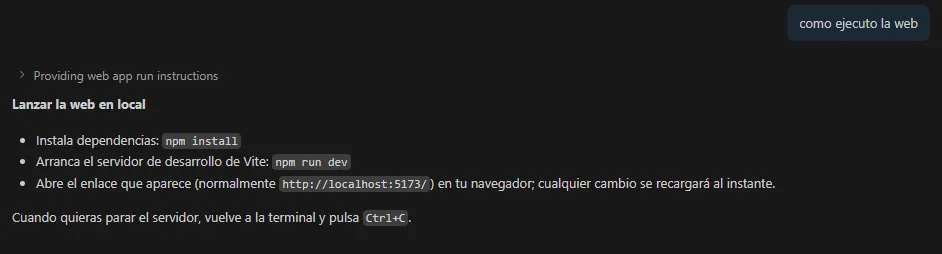
Now there are several options: either you run it from an external console or in my case use the one that is already installed in VSC in the intermediate terminal tab:
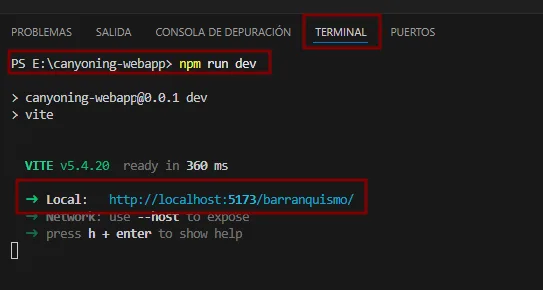
Once the web app is launched, I try to connect to the browser to check if it works:
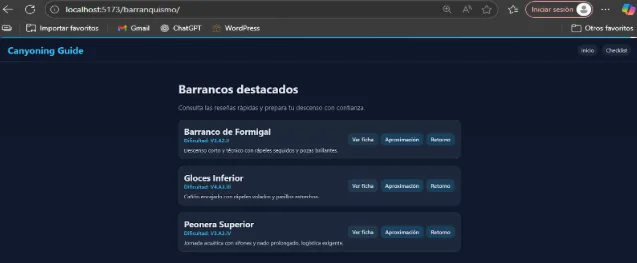
The page worked. In less than 30 minutes I already had a page ready!
Phase 4. Upload the app to GitHub Pages
The initial idea was to take advantage of the service that GitHub has to host the web app, so I asked codex for help on how to do it correctly:
Before starting if we do not have an account GitHub, you create one, it is completely free. Once created, we create the repository, it is very important that it be named after your project folder since otherwise the dependencies will not work correctly.
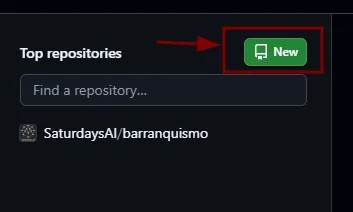
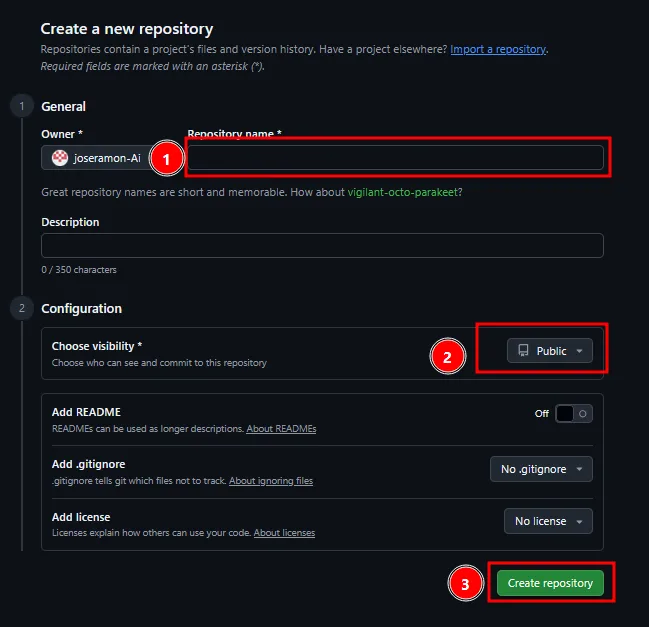
Una vez creado, subimos el repositorio con las siguientes instrucciones desde la carpeta raíz, podemos hacerlo desde una consola o desde la terminal:
If we do not have Git we will have to install it, you can download it here. once installed:
git init // Inicializa un proyecto git en local

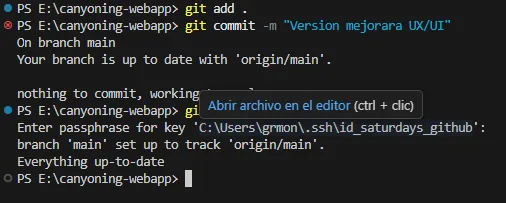
git add . // Agrega archivos al repositorio

git commit -m "Primer commit"       // Guarda los cambios en tu repositorio local

git remote add origin https://github.com/TU_USUARIO/NOMBRE_REPOSITORIO.git
// Link your repository with GitHub.
git push -u origin main // Sube tus cambios a GitHub
Now we have uploaded the same repository that we have locally with GitHub, now for every change we want to make we will have to start the steps from step 2 and it is very important to give the commits names of the modifications that we are making, so that later it is easier to return to a previous state knowing what modifications we made at that moment.
Once we have the repository, we ask codex how to upload it to GitHub pages correctly:
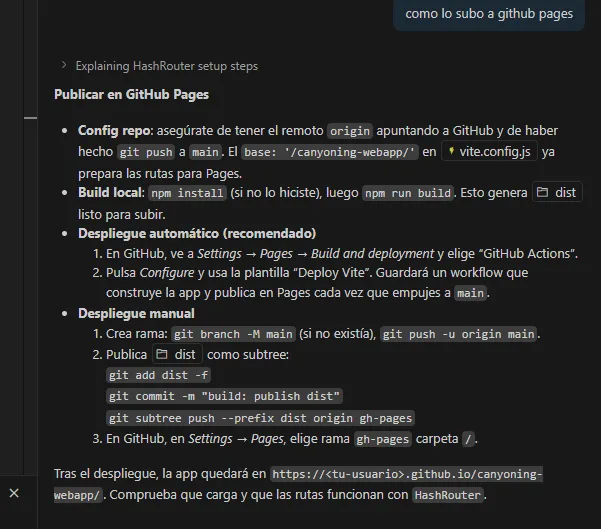
We follow the instructions:
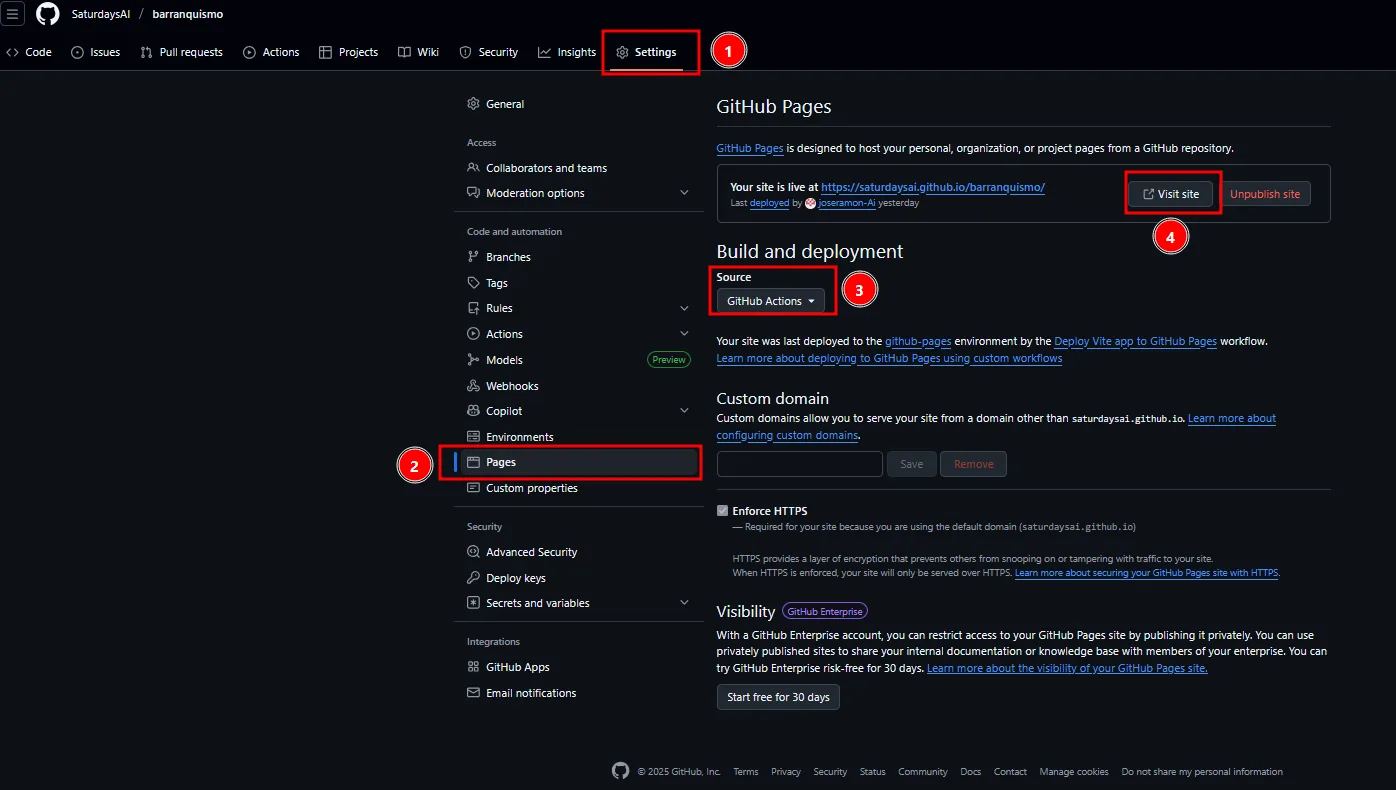
and we access the web app from GitHub:
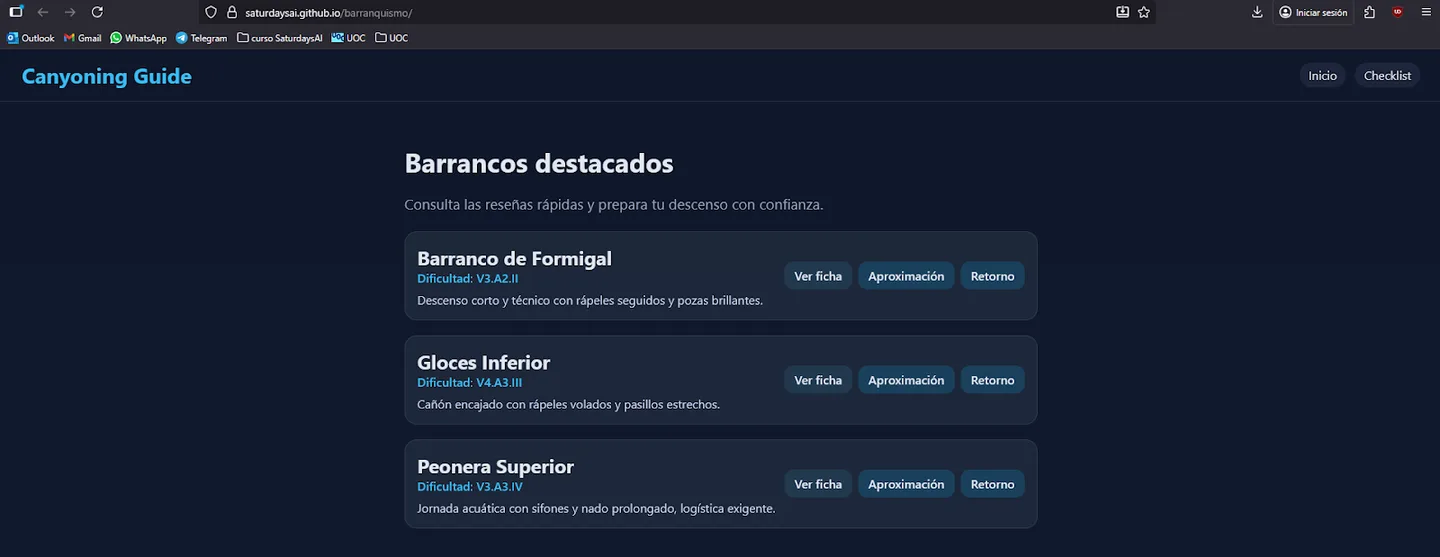
As we can see, the initial version is functional but the data in JSON format is missing and the aesthetics need to be improved.
Phase 5: Collect data and import to JSON
Collecting data from each of the ravines one by one is very tedious, and you also run the risk of making mistakes when extrapolating the data, so I ask Codex if he can help me:
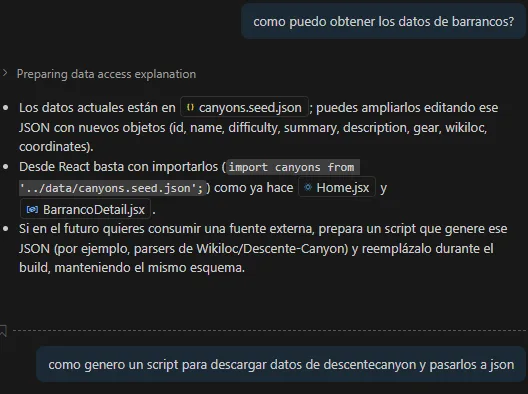
Your response is a script
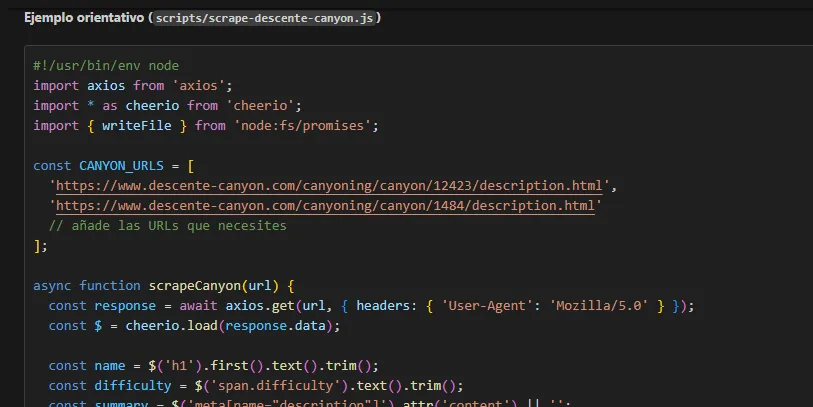
We go one step further, we tell it to generate a script itself and execute it itself and also save it in the JSON file with the gullies that we made fictitious.
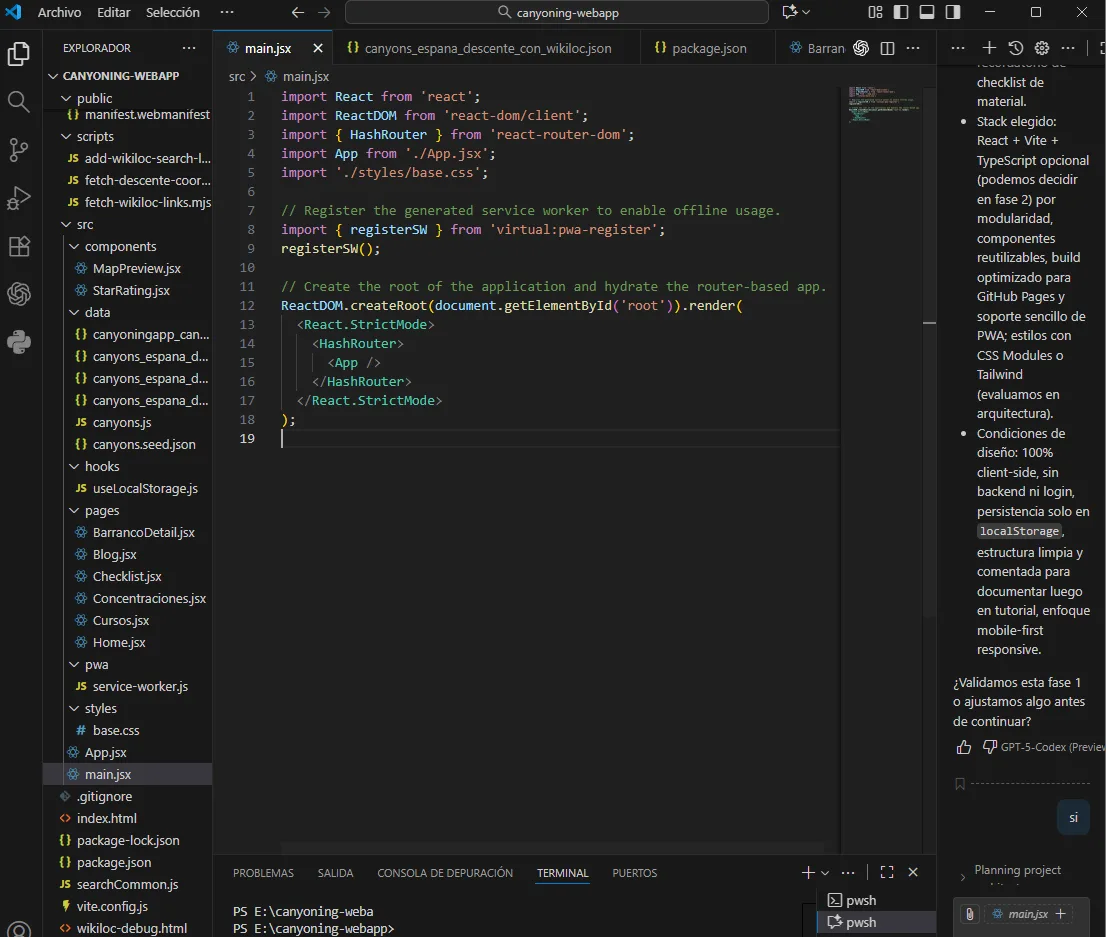
The biggest challenge was information. The data was in open sources, in different formats and each page had a different description of each attribute and did not maintain coherence, so the data I obtained was totally unstructured. I needed a pipeline cleaning.
Phase 6. Data normalization with AI
As data from the ravines came from different sources (Descente-Canyon, Wikiloc, etc.), and they were disordered and in different formats. I needed a script in Node.js to clean them up and unify them.
Prompt a Codex:
“Tengo varios JSON con datos de barrancos. Necesito un script que lea todos, normalice los nombres, extraiga coordenadas y unifique los niveles de dificultad. Exporta un único dataset.json final.”
Codex generated an automated cleanup script. The result: a file dataset.json consolidated, which would serve as the application's local database.
Phase 7. Creation of the React interface
With the dataset ready, it was time to visualize the data. Instead of writing components manually, I ordered them directly from Codex.
Prompt 1:
“Crea un componente que importe 'dataset.json'. Debe incluir buscador y filtros dinámicos (por dificultad y zona). Mapea los resultados en tarjetas (‘BarrancoCard’) enlazadas a una vista de detalle.”
Prompt 2:
“Crea un componente ‘FichaDetalle’. Muestra datos del barranco: rápel máximo, tiempos, coordenadas y enlaces.”Codex generated the complete React structure and the necessary components. He even added an interactive map with Leaflet after another specific prompt.
Phase 8. Add offline “memory”
The app needed to “remember” user data, such as the checklist and ratings.
Prompt a Codex:
“En mi app, los usuarios deben valorar un barranco con estrellas y añadirlo a una ‘Checklist’. Estos datos deben persistir incluso sin conexión. Usa localStorage.”
Codex implemented local storage logic and automatic recovery. Then we configured the Service Worker to make the app fully functional offline: it was already an installable and usable PWA without coverage.
Phase 9. UX/UI design improvement with ChatGPT
The functionality was ready, but the interface needed a professional touch. I returned to ChatGPT, this time as a UX designer specialized in outdoor environments.
Prompt clave:
“Estoy diseñando esta app para usarla en montaña, bajo sol intenso y con reflejos. Dame recomendaciones de UX/UI y un prompt detallado para Codex como si fuera un diseñador profesional.”
# PROJECT CONTEXT
I am developing a PWA in React + Vite called “Canyoning”, designed to be used in mountains and natural environments.
Users will consult it in real field conditions: with intense sunlight, reflections, gloves, and limited connection.
The app shows canyon files with difficulty, material, times and links to Wikiloc.
It has no backend - everything works on the client (localStorage, local JSON) and will be deployed to GitHub Pages.
# OBJECTIVE
I want you to act as a **professional UX/UI designer specialized in outdoor environments, accessibility and functional design**.
Your task is to improve the visual design and user experience of the application **so that it is beautiful, readable and professional**, without losing simplicity or performance.
Give me detailed design suggestions and, if possible, code snippets (JSX, CSS or Tailwind) ready to implement.
# WHAT I WANT TO ACHIEVE
– A **beautiful and coherent** interface, worthy of a professional product.
– **High readability under the sun**: large texts, clear fonts and strong contrast.
– **Visually attractive components** but easy to render in React (no heavy dependencies).
– **Clear visual hierarchy** (well-defined colors, sizes and spaces).
– **Outdoor style**, natural and modern (inspired by apps like Komoot, AllTrails or Wikiloc).
– **Comfortable tactile interaction** (large buttons, immediate visual feedback).
- * * Total mobile adaptation * * (mobile-first with breakpoints to tablet).
– That respects good **accessibility practices (WCAG 2.1)**.
– That proposes a **professional color palette and typography**, ideal for direct sun and natural contexts.
# KEY POINTS YOU SHOULD COVER
1. **Typography**
– Use readable sans-serif fonts (e.g. Inter, Poppins, Nunito, Roboto Flex).
– Sizes: minimum 16–18px for text, 22–28px for titles.
– Good spacing (`letter-spacing`, `line-height`) for reading under reflections.
2. **Colors and contrast**
– High contrast (WCAG AAA) between background and text.
– Propose a professional palette inspired by nature (blues, beige, dark greens, warm grays).
– Includes a high contrast mode or “outdoor mode”.
3. **Components and buttons**
– Large touch areas (minimum 44x44px).
– Rounded buttons with soft shadow or defined edge.
– Visual feedback when clicking (change color, opacity or elevation).
– Maintain consistency in icons, shadows and radii.
4. **Visual design**
– Functional minimalism: without being overloaded, but visually pleasing.
– Clear distribution: fixed header, list of ravines with well-separated cards and accessible details.
– Balanced use of color for hierarchy: titles, primary buttons, secondary actions.
5. **Global style**
–Insp
iration in Material Design and Fluent UI, adapted to outdoor use.
– Subtle animations (fade, scale) only if they do not affect performance.
– Soft edges, natural shadows, wide spaces.
– Consistency between Home, Detail and Checklist.
6. **PWA and performance**
– Preloaded fonts and colors.
– Don't use heavy images, use SVG or vector icons.
– Optimize for offline mode (minimal CSS and assets).
7. **Accessibility**
– Minimum contrast 4.5:1 in all texts.
– Colors accessible to colorblind people (use color+shape).
– Alt text on icons, ARIA roles on buttons.
# EXPECTED RESPONSE FORMAT
– ✅ List of UX/UI recommendations ordered by priority (high, medium, low).
– 🎨 Proposal for a professional **color palette and typography**.
– 💻 Concrete examples of CSS or Tailwind to implement.
– 🧠 Brief justification for each suggestion (why it improves visibility, aesthetics or usability).
– 📱 Textual or wireframe mockup (optional) for the ideal structure of the main screen.
# TECHNOLOGIES
– React + Vite
– Tailwind or CSS Modules
–LocalStorage
– GitHub Pages (Static PWA)
# FINAL INSTRUCTION
Act like a professional UX/UI designer.
Don't give theory: **give me proposals ready to apply** with specific code or styles.
Balances **beauty, usability and outdoor functionality**.
The result should look like it was made by an expert designer, but optimized for React and lightweight PWAs.
The result was a complete guide: legible fonts (Inter, Poppins), high contrast, large buttons, clear visual hierarchy and style outdoor inspired by Komoot and AllTrails. Codex applied the improvements automatically and the interface gained clarity, accessibility and consistency.
Phase 10. Final deployment and testing
Once he requested those changes from Codex, he modified what he considered necessary, after a few minutes (it is fascinating to see how he modifies the code in real time) a version was ready as he needed:
I viewed the page again by executing in the console:
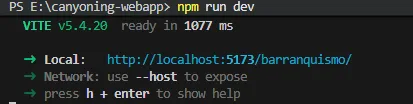
I go into the browser and…
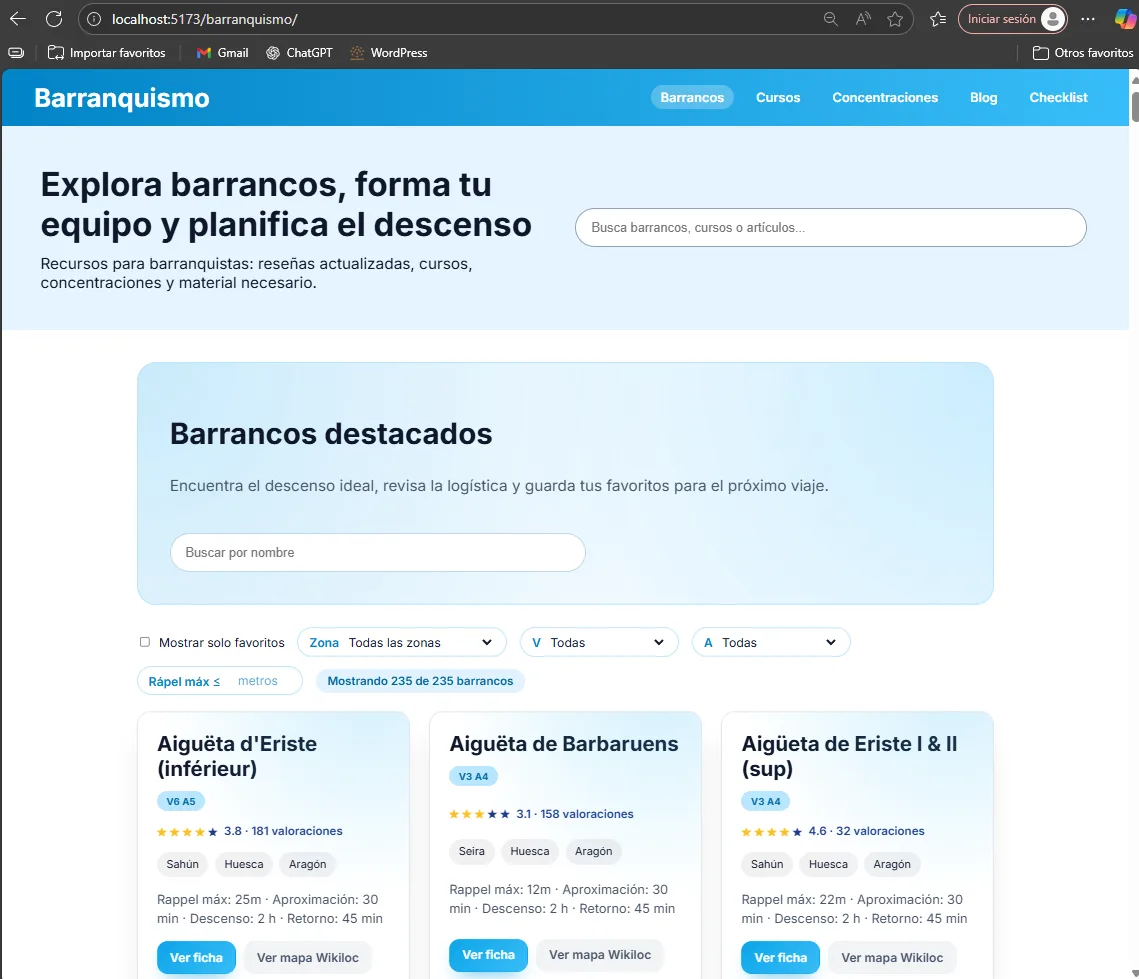
The page I had created was now ready and functional. After verifying the changes, I ran a new git push and waited for the update of GitHub Pages. Sometimes changes take a while to be reflected by caching or localStorage, but after cleaning the browser, the new version worked perfectly.
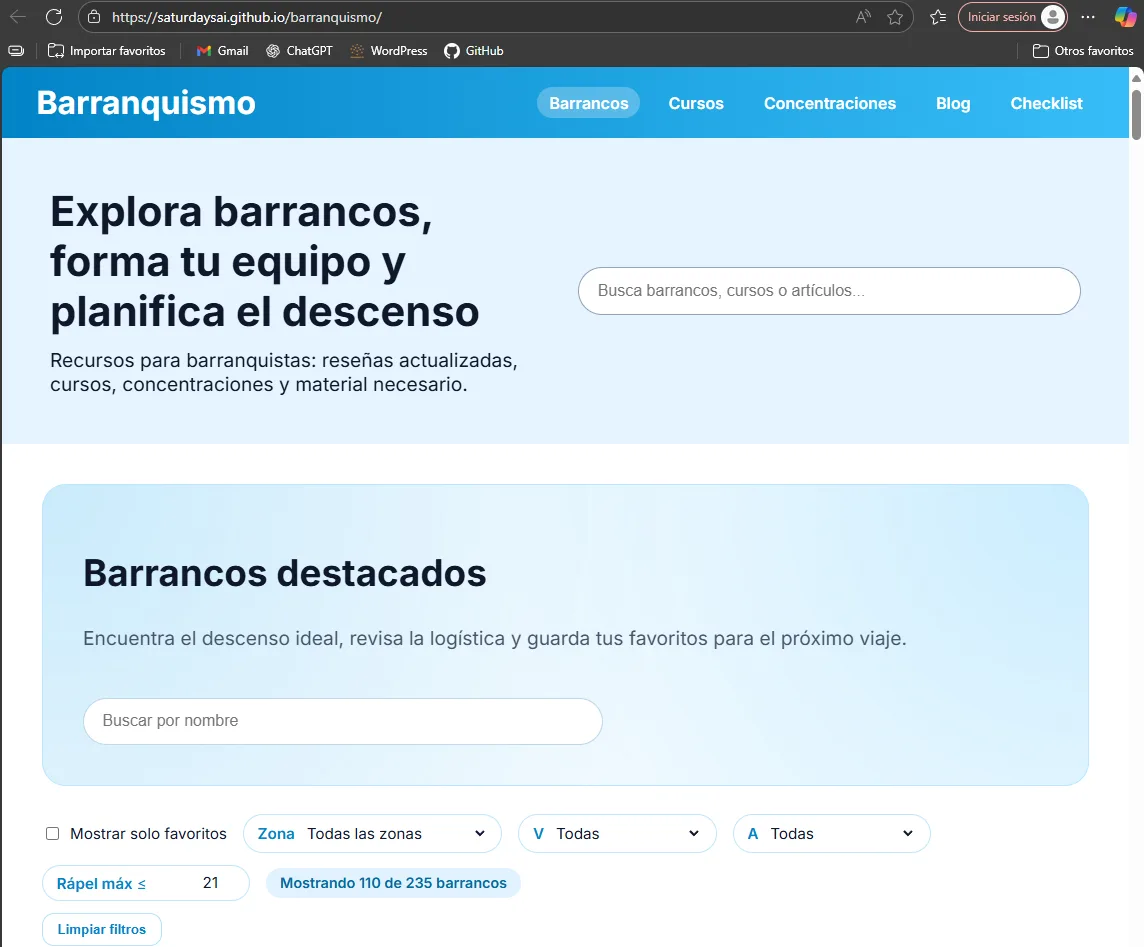
I now had a complete, functional, lightweight app generated entirely with AI.
Conclusions and learnings
Developing this application was much more than programming: it was learning to communicate with an AI. The role of the developer changes: it is no longer about writing code, but about formulate problems, guide the system and validate results.
- Precision in prompts is everything. Good context produces clean, functional code.
- Human validation remains essential. AI makes suggestions, but you decide what to accept or adjust.
- The hybrid workflow (ChatGPT + Codex) is tremendously efficient for personal projects or prototypes.
- GitHub Pages and PWA are the perfect pair for projects without a backend.
Resources and links
- GitHub repository: https://github.com/SaturdaysAI/barranquismo
- Framework: React + Vite
- AI used: ChatGPT (UX and technical assistant) and Codex (code generation)
- Key libraries: Leaflet, Workbox, TailwindCSS
- Deployment: GitHub Pages (Static PWA)
- Web: https://saturdaysai.github.io/barranquismo/
About the author
José Ramón García
Computer Engineering student, passionate about technology applied to nature. He combines his professional experience in the food industry with software projects and outdoor apps. Explore how www.saturdays.ai uses artificial intelligence to enhance human creativity and productivity in real environments.
A history of the Saturdays.AI community. Originally published on Oct 28, 2025.
← More community stories