
The Extension That Helped Me Create a WebApp in Less than 2 Hours
Did you know that improving your code can be easier than ever? I tried Qodo, an extension for VS Code, and was surprised by how it optimizes existing code, understands subjective instructions, and adapts to both newbies and…

This archive includes automatic translations. Audio, video and text inside images remain in their original language.
If you're a developer, you're probably always looking for ways to optimize your workflow. I recently had the opportunity to try Qodo (formerly known as Codium), an extension for Visual Studio Code that promises to help you fix and improve existing code super efficiently. Today I want to tell you about my experience with this tool, how I installed it, what makes it different and why I think it can be a great ally in any project.
Installation: As Easy as Creating an Account
The first thing that surprised me about Qodo was how easy it is to install. Literally within a couple of minutes it was up and running. You just need to go to the VS Code extension store, search for Qodo and install it. Then you create an account (a super quick process) and that's it. There were no complicated setups or strange steps, which is appreciated when you want to start using something right away.
Usability: Intuitive and Straight to the Point
Once you have Qodo running in your environment, you realize that it is designed to be easy to use. There is no complicated learning curve; The commands and tools are built right into VS Code, so it feels like a natural part of the workflow. From the beginning, you can tell that Qodo is not made to reinvent the wheel, but to make your life easier.
How is Qodo Different?
If you've tried tools like Cursor, you'll notice that Qodo takes a different approach. While other solutions are more geared towards generating code from scratch, Qodo is a master at fix, optimize and improve existing code. For example, you can write code that works but isn't optimal, and Qodo will offer suggestions to make it cleaner, more efficient, or just more elegant.
Another interesting feature is its ability to interpret subjective instructions. In a test, I asked him to adjust the color of a web page to a “formal orange, that feels dynamic, like something a serious company would use, not a sports drink brand.” Qodo understood perfectly what I wanted and gave me the ideal color. This level of subjective understanding is something I haven't seen in other similar tools.
Ideal for Novice and Expert Programmers Alike
Qodo adapts to different levels of experience. If you are a beginner in programming, it can help you solve basic problems and avoid common mistakes. If you already have experience, but are working in an area that you don't fully master (like web development, for example), it can also be a great support.
I tested it by creating an interactive web page from scratch. In less than two hours, with my limited web design experience, I had a functional page. Additionally, if you spend more time and rely on Qodo's suggestions, you can build more complex projects even without being an expert on the subject.
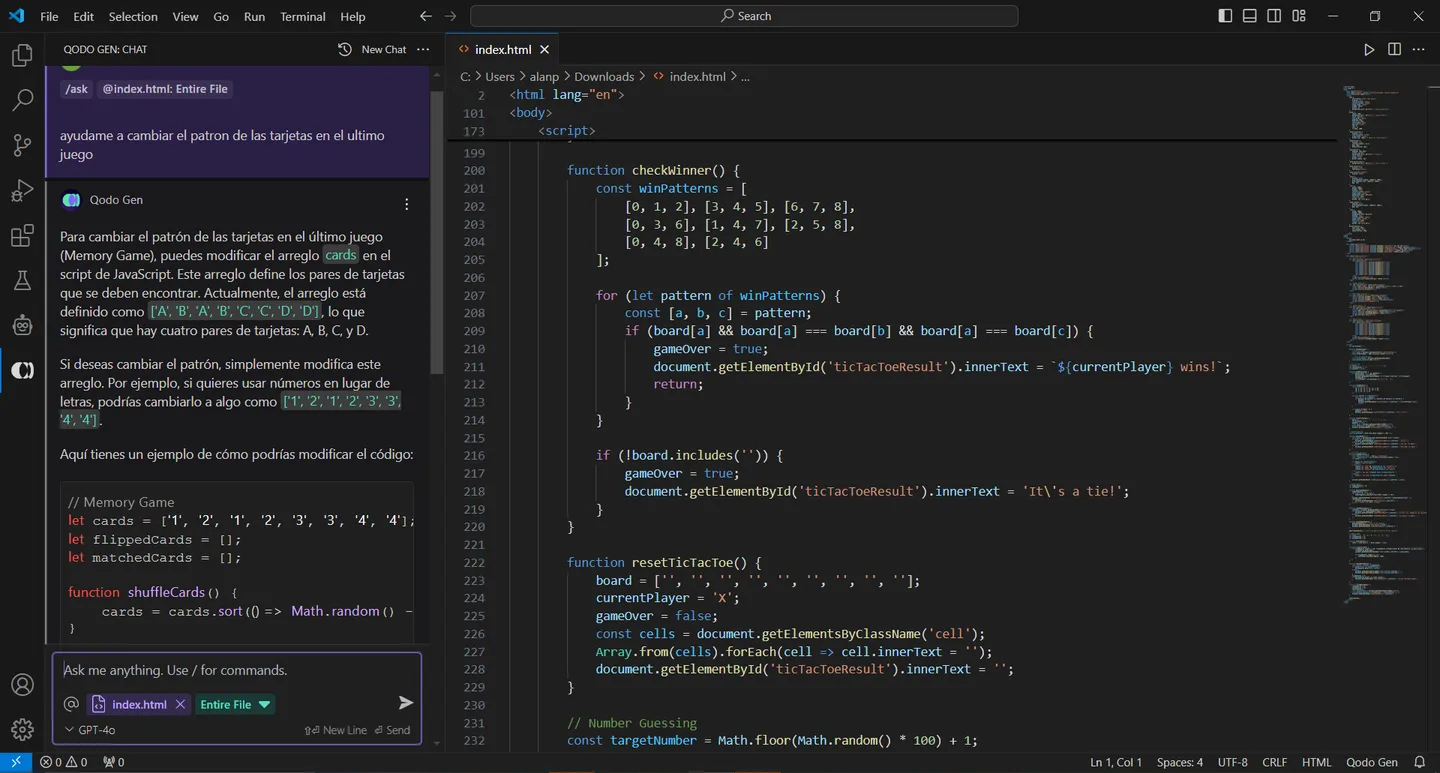
“Task-Aware Coding”: An Innovative Feature
One of the most notable features of Qodo is what they call «task-aware coding». Basically, you can write in natural language what the problem you are trying to solve is and how you plan to address it. With this information, Qodo adapts its suggestions and helps you stay focused on your goal. For example, if you tell it that you want to optimize the loading speed of a page, the suggestions will be specifically aimed at improving code performance.
Best of all, it's not limited to just one environment. In addition to the VS Code extension, Qodo offers integrations with GitHub, GitLab and Bitbucket, a Chrome extension and even a CLI tool. This allows you to work with Qodo virtually anywhere in your development flow.
Is Qodo Worth Trying?
Definitely, yes. Qodo is a practical, accessible and well-thought-out tool that adapts to different levels of experience and types of projects. Its focus on improving existing code instead of generating it from scratch is a differentiator that makes it stand out from other tools. Additionally, its ability to understand subjective instructions and its integration with multiple platforms make it a versatile solution for any developer.
Whether you're just getting started in the world of programming or are a veteran looking to optimize your workflow in a specific area, Qodo has something to offer. If you haven't tried it yet, I recommend you give it a try. It could become your new favorite code assistant.
If you want to see what you can do in less than two hours, click on the link:
A history of the Saturdays.AI community. Originally published on Nov 18, 2024.
← More community stories